Types of Data & Visualization Guide
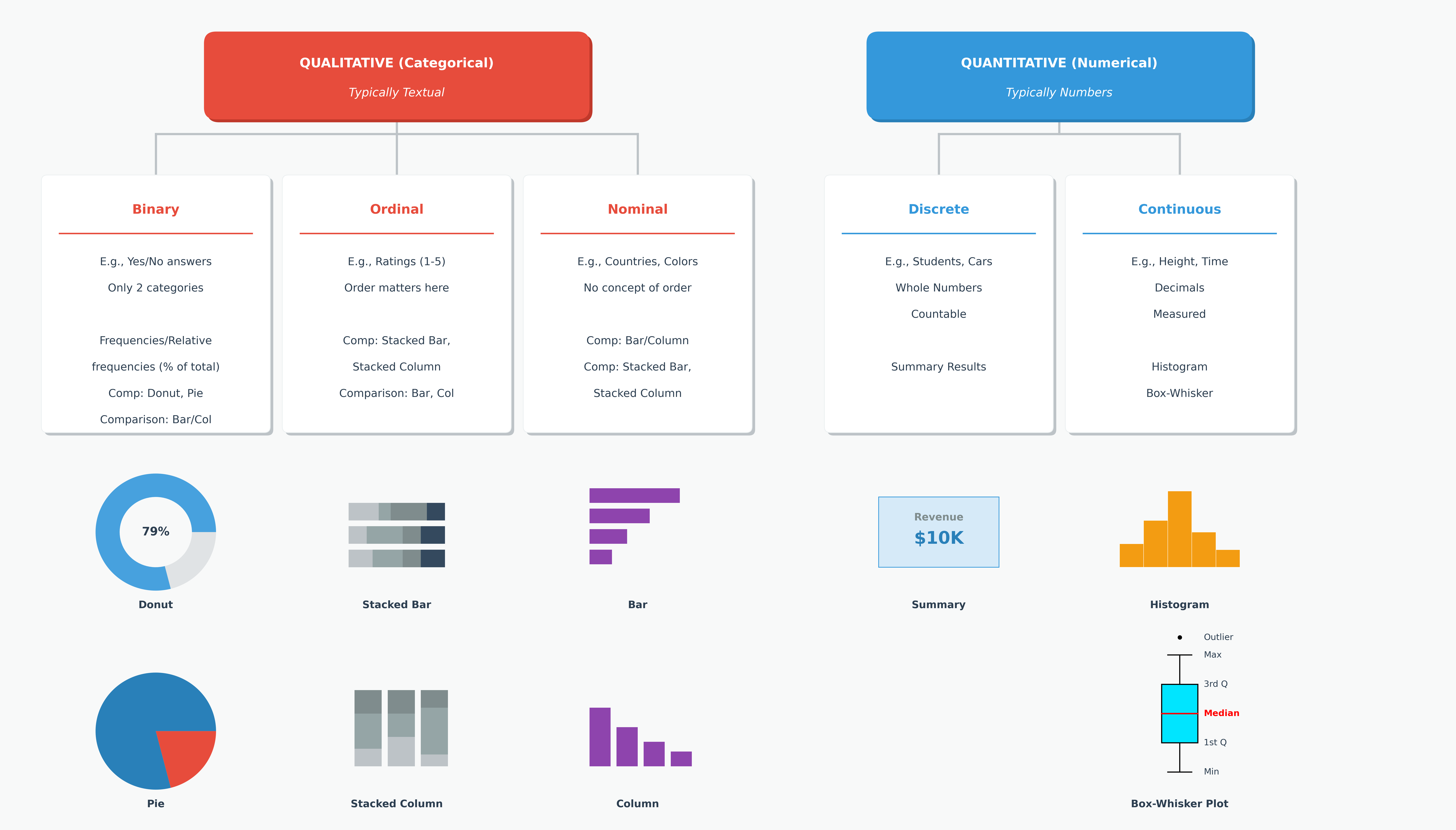
Understanding the type of data you are working with is the first step in choosing the right visualization. Broadly, data is classified into two main types: Categorical and Numerical.
1. Categorical Data (Qualitative)
Represents labels, groups, or categories. It answers the question "What type?"
- Nominal: No intrinsic order (e.g., Colors: Red, Blue, Green; Gender: Male, Female).
- Ordinal: Has a clear order or rank (e.g., T-Shirt Size: S, M, L, XL; Satisfaction: Low, Medium, High).
2. Numerical Data (Quantitative)
Represents quantities or measurements. It answers the question "How much?" or "How many?"
- Discrete: Countable whole numbers (e.g., Number of students in a class, Number of cars sold).
- Continuous: Measurable values that can have decimals (e.g., Height, Weight, Temperature, Price).
Choosing the Right Chart
The choice of chart depends heavily on the number of variables you are analyzing and their data types.
Univariate Analysis (One Variable)
When analyzing a single variable, we are often interested in its distribution (for numerical data) or frequency (for categorical data).
| Data Type | Recommended Chart | Description |
|---|---|---|
| Numerical | Histogram | Shows the frequency distribution of continuous data by grouping it into bins. |
| Numerical | Box Plot | Shows the spread, median, and outliers of the data. Great for detecting anomalies. |
| Categorical | Bar Chart | Shows the count or frequency of each category. Easy to compare magnitude. |
| Categorical | Pie Chart | Shows the part-to-whole relationship. Use sparingly, as comparing angles is difficult for humans. |
Bivariate Analysis (Two Variables)
This involves exploring the relationship between two variables.
1. Numerical vs. Numerical
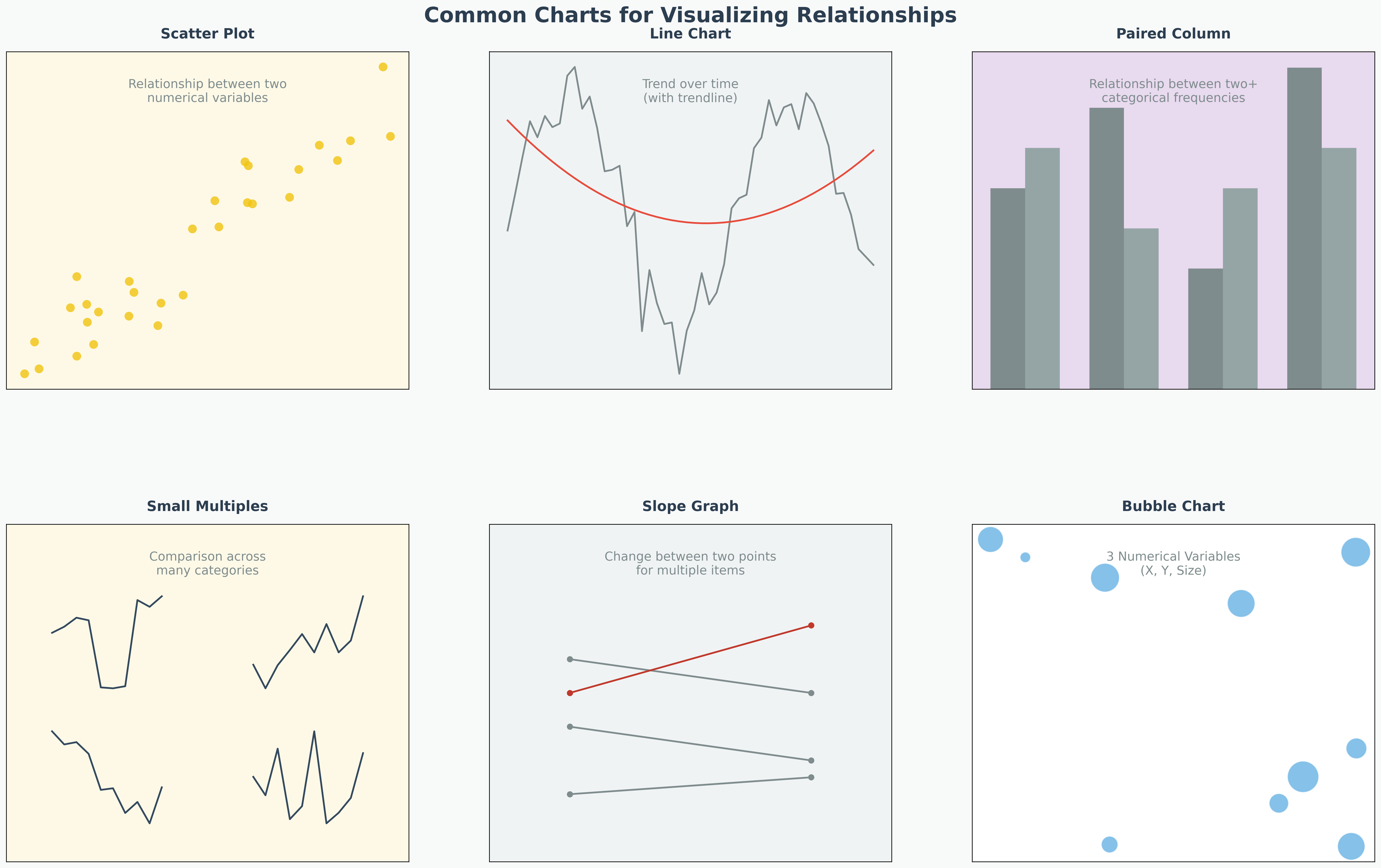
- Scatter Plot: The gold standard for seeing relationships (correlations).
- Example: Price of a house vs. Square footage.
- Line Chart: Best when one variable is Time (a continuous interval).
- Example: Stock price vs. Date.
2. Categorical vs. Numerical
- Box Plot (Grouped): Compare distributions across groups.
- Example: Salary (Numerical) distributions across different Job Titles (Categorical).
- Bar Chart (Aggregated): Compare a summary statistic (mean/sum) across groups.
- Example: Average Sales (Numerical) for each Region (Categorical).
- Violin Plot: Similar to a box plot but shows the probability density of the data at different values.
3. Categorical vs. Categorical
- Grouped Bar Chart: Compares counts of one category broken down by another.
- Example: Number of survivors on Titanic by Sex and Class.
- Stacked Bar Chart: Shows the composition of a category.
- Example: Sales breakdown by Product Category within each Quarter.
- Heatmap: Uses color intensity to show the frequency or magnitude of the relationship (often based on a cross-tabulation).
Multivariate Analysis (3+ Variables)
Visualizing more than two variables requires creative use of visual channels like color, size, and shape.
1. Bubble Chart (3 Variables)
An extension of the scatter plot.
- X-axis: Variable 1 (Numerical)
- Y-axis: Variable 2 (Numerical)
- Bubble Size: Variable 3 (Numerical)
- Example: GDP vs. Life Expectancy, with bubble size representing Population.
2. Colored Scatter Plot (3 Variables)
- X-axis: Variable 1 (Numerical)
- Y-axis: Variable 2 (Numerical)
- Point Color: Variable 3 (Categorical or Numerical)
- Example: Height vs. Weight, colored by Gender.
3. Facet Grids / Small Multiples (3+ Variables)
Creating a grid of smaller charts based on a categorical variable.
- Example: Plotting "Age vs. Fare" scatter plots separately for "First Class", "Second Class", and "Third Class" passengers.
4. Pair Plot (Many Variables)
A matrix of scatter plots that shows the relationship between every pair of numerical variables in a dataset. The diagonal usually shows a histogram of each variable. This is a powerful tool in EDA to spot correlations quickly.
Summary of Relationships
| Variable Combination | Recommended Chart | Description |
|---|---|---|
| Numerical vs. Numerical | Scatter Plot, Line Chart (Time) | Shows correlation or trend. |
| Categorical vs. Numerical | Box Plot, Bar Chart (Aggregated) | Compares distributions or summaries across groups. |
| Categorical vs. Categorical | Stacked Bar Chart, Heatmap | Shows composition or frequency of intersection. |
| 3 Numerical Variables | Bubble Chart | X and Y axes for the first two; Bubble Size for the third. |
| 2 Numerical + 1 Categorical | Colored Scatter Plot | X and Y axes for numbers; Color or Shape for the category. |
| Many Variables (Multivariate) | Facet Grids, Pair Plot | Breaks down complex data into smaller grids or matrices. |