More on Functions
As you already learned in the first chapter, functions are fundamental building blocks in Python. In this lesson, we will explore more advanced aspects of functions, including documentation, scope, and variable arguments.
Documentation
You can add documentation to a function so that others can understand how to use it by adding comment lines with triple quotes (single or double). Here is the modified function with documentation:
def calculate_triangle_area(height, base):
    """
    Calculates the area of a triangle given its height and base.
    """
    area = (height * base) / 2
    return area
You will notice that this function has documentation described between triple single quotes. This content will be displayed when a user invokes the built-in help() function by passing the name of the function as an argument.
Example invocation:
help(calculate_triangle_area)
Output:
Help on function calculate_triangle_area in module _main_: calculate_triangle_area(height, base) Calculates the area of a triangle given its height and base.
Function Definitions with Default Values
Sometimes you may need to define a function with one or more default argument values. In such cases, all default arguments must be defined after all non-default arguments. Here is an example:
def do_something(state, county, country="US"):
    print(country, state, county)


do_something("MI", "Wayne")
do_something("MI", "Wayne", "United States of America")
Output:
US MI Wayne United States of America MI Wayne
With the definition above, you can invoke the function with or without a value for country. If a value is provided, it will be used; otherwise, the default value defined in the function will be used.
Function Definitions with Variable Arguments (*args and **kwargs)
Occasionally, you may require a function that can accept a variable number of arguments. You can use the * (asterisk) and/or ** (double asterisk) before parameter names to receive multiple comma-separated arguments or keyword arguments, respectively.
def do_something(*args, **kwargs):
    print(kwargs)  # Receives a dictionary of keyword arguments
    print(args)  # Receives a tuple of positional arguments


do_something(1, 2, 3, country="US", county="Wayne")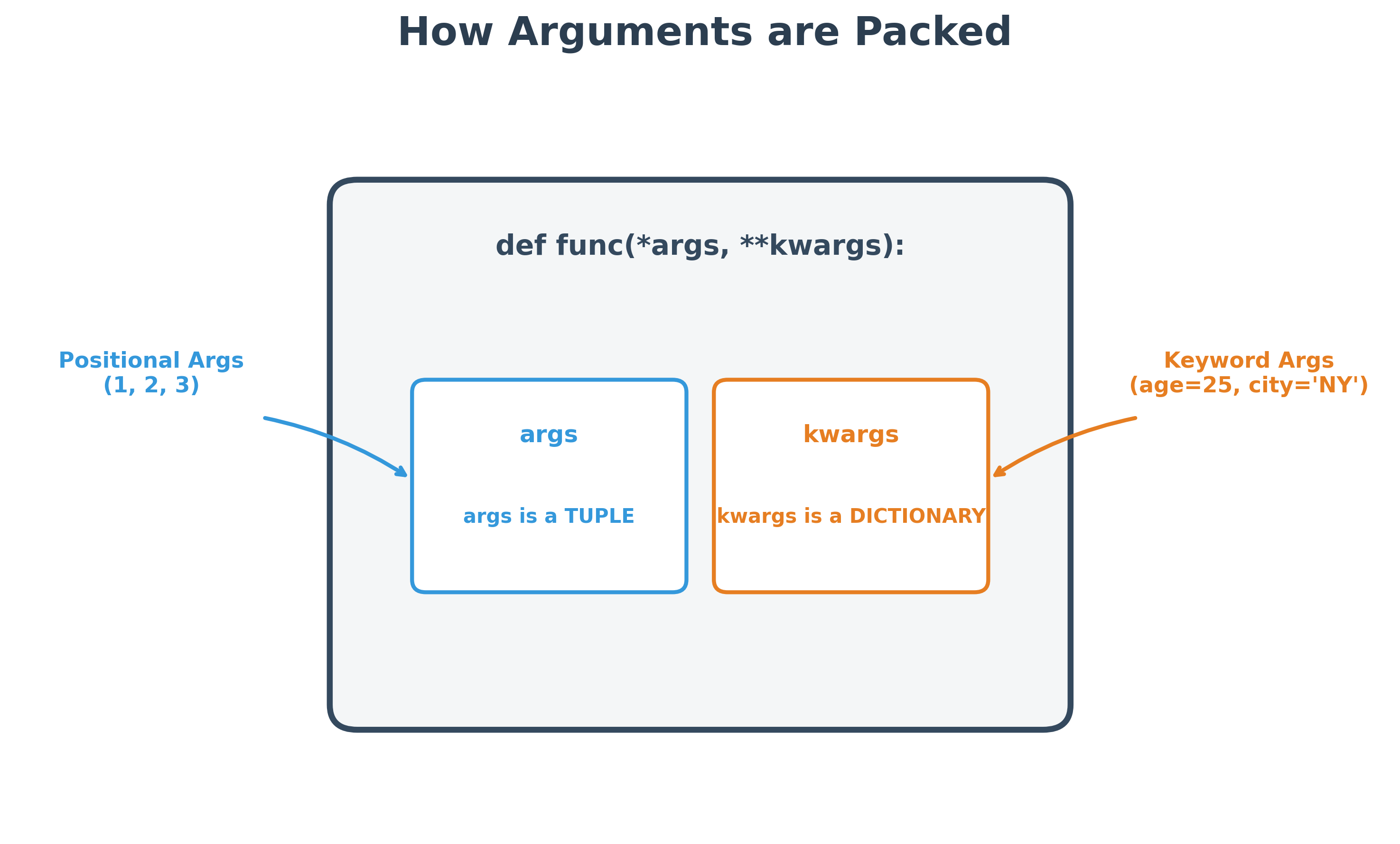
Output:
{'country': 'US', 'county': 'Wayne'} (1, 2, 3)
Referencing Variables from Outer Scope
To modify a variable defined outside of a function, you must use the global keyword. Attempting to modify an outer variable without it will result in an error:
x = 10


def do_something():
    x += 100  # This will cause an error
    print(x)


do_something()
Output:
UnboundLocalError: local variable 'x' referenced before assignment
You can fix this by using the global keyword for the variable x:
x = 10


def do_something():
    global x
    x = x + 100
    print(x)


do_something()
Output:
110
Note: All variables declared inside a function are considered local by default unless the global keyword is used. However, you can freely read an outer variable inside a function without the global keyword:
x = 10


def do_something():
    print(x)  # Reading x is allowed


do_something()
Output:
10
Understanding Variable Scope in Python
By default, all variables declared in a Python file (which becomes a module if used by other programs) are visible to conditional code blocks like if, while, and functions within that same file.
However, variables declared in a module are not automatically global to the entire system. They cannot be referenced by name alone inside other files. To access variables from another module, you must import that module and prepend the variable name with the module name or namespace.
* for Unpacking Collections
The asterisk (*) performs argument unpacking when used with an enclosing function. Here is an example:
def multiply(a, b):
    return a * b


print(multiply(*[2, 3]))
Output:
6
Note that you cannot use the asterisk by itself without an enclosing function. Although this example uses a list, you can replace it with any collection object like a tuple or set.
** for Unpacking Dictionaries
You can use the double asterisk (**) to unpack a dictionary into name-value pairs. Like the single asterisk, it should be used as an argument to a function. Here is an example:
def do_something(country, state, county):
    print(country, state, county)


my_place = {
    "state": "Michigan",
    "county": "Wayne",
    "country": "United States",
}
do_something(**my_place)
Output:
United States Michigan Wayne
- You can set default values for certain parameters by defining them after all non-default parameters.
- You can send a variable number of positional arguments to a function by using an asterisk before the parameter name.
- You can send a variable number of keyword arguments by using a double asterisk before the parameter name.
- Multiple arguments are separated by commas in both the definition and invocation.
- The order of arguments is important: you should maintain the same order as the definition unless the function is defined to handle arbitrary arguments or keyword lists.
- A
returnstatement, if present, sends an object back from the function to the calling program. - A function must be defined before it is called; otherwise, you will receive a
NameError.
It is recommended to name variables with nouns and functions with verbs. A variable holds a value and does not inherently "do" anything, so it should be a noun. A function, on the other hand, performs an action on the arguments passed to it and should be named with a verb.
Anonymous Functions (Lambda Functions)
In Python, you can create functions without the def keyword or a name. These are called Lambda functions. They are useful when a function has only one expression in its body.
Standard function:
def add(x, y):
    return x + y
Lambda version:
(lambda x, y: x + y)(5, 10)Output:
15
In this example, the Lambda function takes x and y as arguments, and the expression x + y after the colon is the function body. Lambda functions have no name and are invoked immediately when arguments are passed to them in parentheses.
Iterators and Iterables
An iterator is an object containing a countable number of values that can be traversed. It yields one element at a time when we call the built-in function next() on it.
- Iterable: Any object that you can obtain an iterator from (e.g., lists, strings, dictionaries, tuples). You obtain the iterator by calling
iter(iterable). - Iterator: The actual object you can call
next()on to traverse elements.
fruits = ["Apple", "Plum"]

# Trying to call next directly on an iterable list raises a TypeError!
# next(fruits)  # TypeError: 'list' object is not an iterator

# Get the iterator
fruit_iterator = iter(fruits)
print(type(fruit_iterator)) # <class 'list_iterator'>

print(next(fruit_iterator)) # "Apple"
print(next(fruit_iterator)) # "Plum"

# Once empty, calling next() raises StopIteration:
# print(next(fruit_iterator)) # StopIteration
Under the Hood: What the for Loop Does
When you write a for loop, Python doesn't just index into the sequence. Instead, it translates it behind the scenes into an infinite while loop that calls next() on the iterator and handles the StopIteration exception:
# Standard loop
for item in ["A", "B"]:
    print(item)

# Behind the scenes equivalent
it = iter(["A", "B"])
while True:
    try:
        item = next(it)
        print(item)
    except StopIteration:
        break # Exit gracefully when empty
The yield Keyword
When a function executes a return statement, it terminates the function call and returns the execution flow to the calling statement. The state of the variables inside the function is then released for garbage collection (a system program that removes unreferenced variables from memory to free up space).
If a function executes a yield statement instead, the state of its variables is saved, and the function returns a generator object.
Example:
import random

def stream_sensor_data(sensor_id, limit=5):
    """
    Simulates streaming live sensor readings on demand,
    avoiding loading a massive dataset into memory.
    """
    for count in range(limit):
        # Generate a random temperature reading between 20.0 and 25.0
        reading = random.uniform(20.0, 25.0)
        yield {"sensor": sensor_id, "reading": f"{reading:.2f}°C", "reading_num": count + 1}


# Create the generator object
sensor_stream = stream_sensor_data("TEMP_ROOM_101")
print(type(sensor_stream)) # <class 'generator'>
This generator object is iterable. We can use a for loop to consume the measurements one at a time on demand:
for data_point in stream_sensor_data("TEMP_ROOM_101", limit=3):
    print("Received:", data_point)
This prints three sequential readings generated on the fly, without storing any huge arrays in memory.
Generator Expressions
Generator expressions look similar to list comprehensions but do not construct a list object; instead, they create a generator.
Rather than creating a full list and storing the entire sequence in memory, a generator produces the next item in the sequence one at a time, on demand.
[i for i in range(5)]  # Returns a list object with values 0 to 4
(i for i in range(5))  # Returns a generator object that yields values 0 to 4
You can use generators in any situation where a collection is required. For example, if you want to use the built-in sum() function, you could use either a list or a generator:
sum([1, 2, 3])
sum([i for i in range(4)])  # List comprehension
sum(i for i in range(4))  # Generator expression
All of the above produce the same result. However, in the first and second cases, the entire list exists in memory. In the third case, only the generator object is in memory, producing each number as it is needed for the calculation.
Hands-on Exercises
Exercise 1: Quick Tax Calculator (Lambda Function)
In data processing pipelines, we often use quick, unnamed functions to apply mathematical adjustments (like tax calculations). Write a Python program to:
- Define a lambda function that accepts one parameter (
price) and returnsprice * 0.15(a 15% sales tax). - Store the lambda function in a variable
calculate_tax. - Call this function with a price of
250.00and print the returned tax amount.
# Write your code below and click Run CodeClick to view Answer
# Lambda function definition
calculate_tax = lambda price: price * 0.15

tax_amount = calculate_tax(250.00)
print("Sales tax is:", tax_amount) # Output: 37.5
Exercise 2: Even Number Generator (yield)
For very large datasets, loading all numbers into memory at once is slow. We can generate them on the fly. Write a Python program to:
- Define a generator function
even_generator(limit)that takes a target integer. - Inside, use a
whileorforloop to scan integers starting at2up tolimit. - Use the
yieldkeyword to return each even integer one by one. - Call
even_generator(10)inside aforloop and print each yielded number.
# Write your code below and click Run CodeClick to view Answer
def even_generator(limit):
    n = 2
    while n <= limit:
        if n % 2 == 0:
            yield n
        n += 1

# Loop through the generator on demand
for even_num in even_generator(10):
    print(even_num)
# Output will display: 2, 4, 6, 8, 10