Regular Expressions
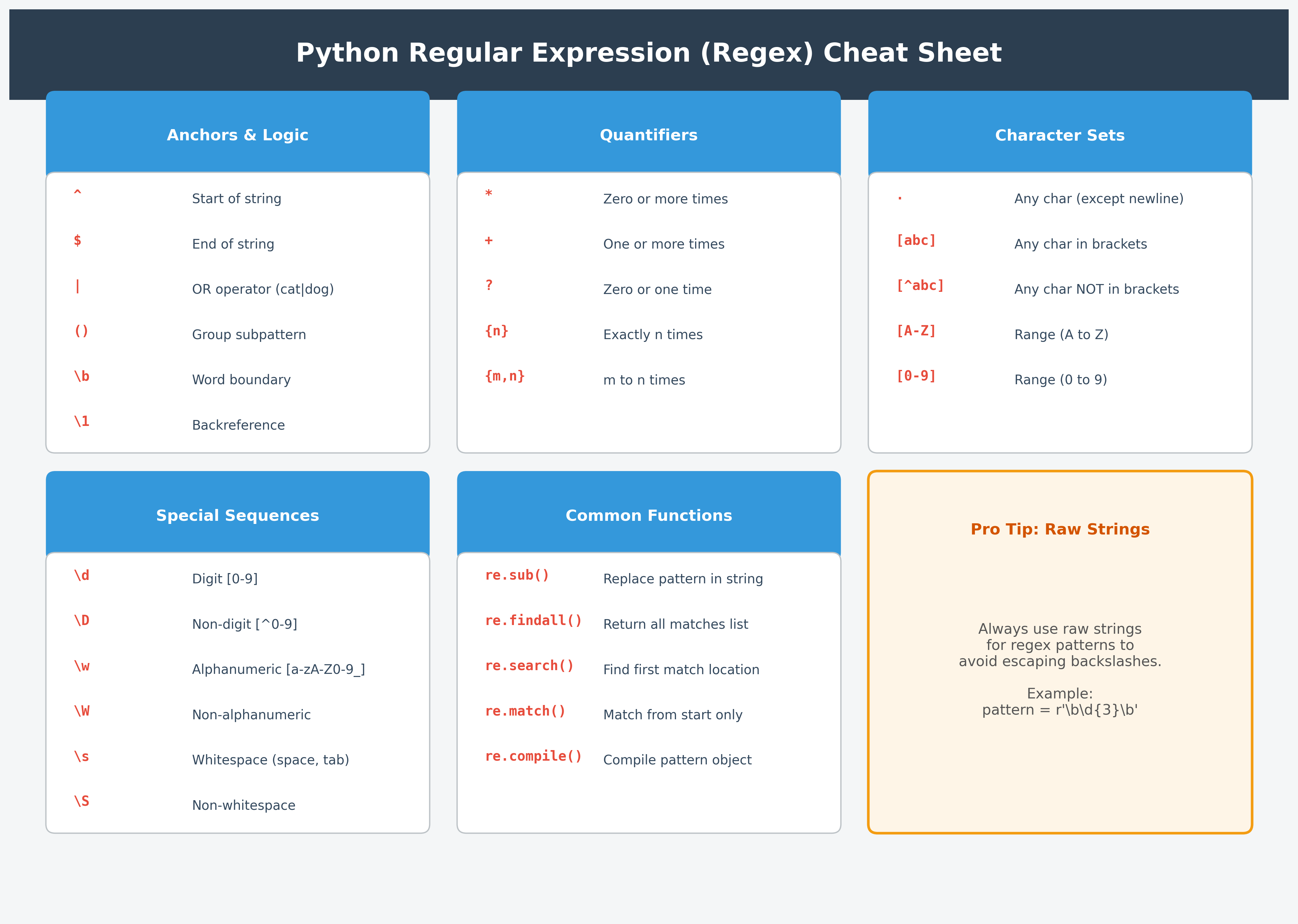
When it comes to searching for a character pattern, using Regular Expressions is the preferred method. Regular expressions (also known as regex or RE) allow you to search for and manipulate sequences of characters within text by matching a specific search pattern.
Regex syntax generally follows one of two main methodologies: Posix or Perl. Python uses a syntax similar to Perl. To use regex in Python, you must import the re module.
Regex is typically used for:
- Search and Replace: Substituting a substring or an entire string with another string (
re.sub). - Pattern Matching: Finding all substrings that match a specific pattern (
re.search,re.findall).
Regular Expression for Substitution (sub)
Substitution allows you to replace specific substrings with other text. While you can use the built-in replace() method for simple strings, regex provides significantly more power.
import re

my_text = "catorangecatdogapplekiwi"
# Replaces all occurrences of 'cat' with 'CAT'
result = re.sub("cat", "CAT", my_text)
print(result)
Output:
CATorangeCATdogapplekiwi
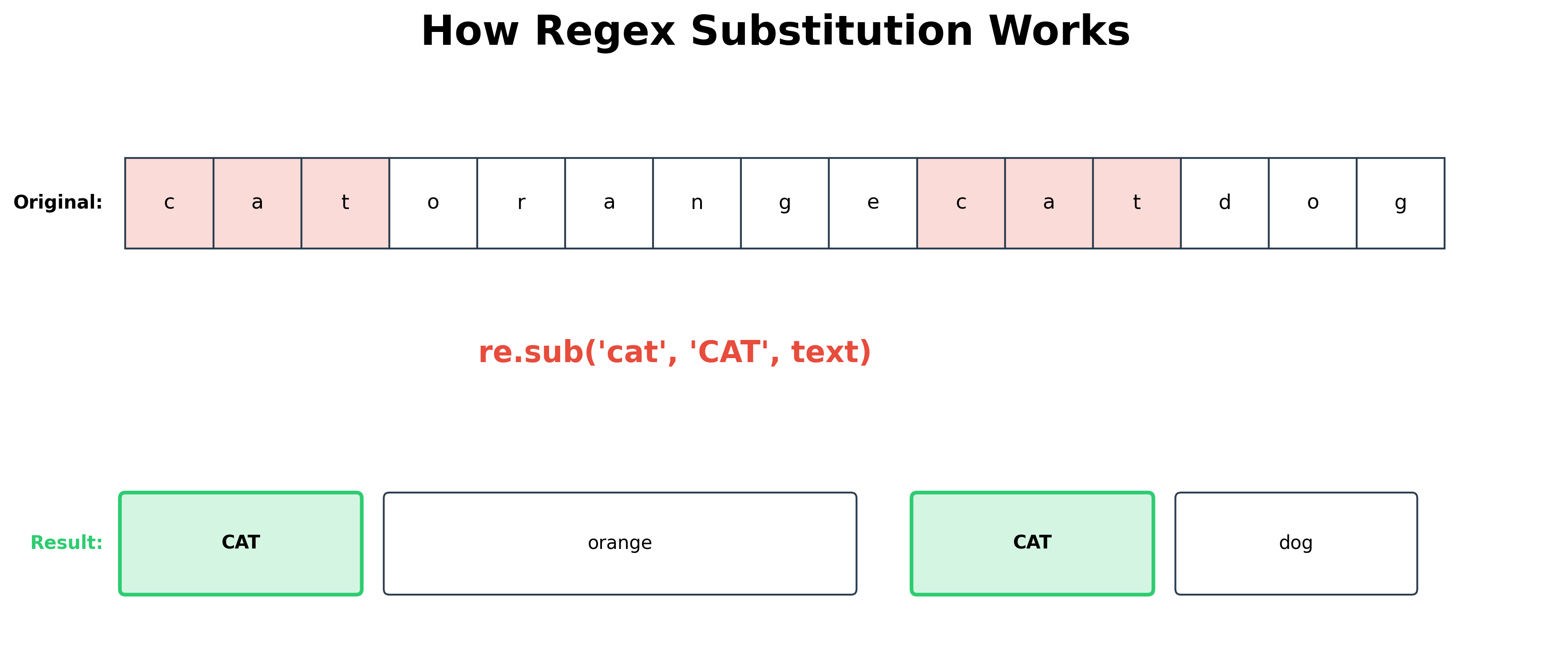
Regex is particularly useful when you need to match multiple patterns at once. For example, to replace both "cat" OR "dog" with a dash (-):
import re

my_text = "catorangecatdogapplekiwi"
# Using the OR (|) operator
result = re.sub("cat|dog", "-", my_text)
print(result)
Output:
-orange--applekiwi
By using the OR (|) operator, you can search and replace any number of substrings with a single expression, known as a pattern.
Common Regex Notations
| Special Char | Example | Output | Comments |
|---|---|---|---|
| |
re.sub('cat|dog', '-', 'catorangedog') |
-orange- |
OR operator. Matches either 'cat' or 'dog'. |
* |
re.sub('ca*', '-', 'cadcaaaatorangedog') |
-d-torangedog |
Matches zero or more occurrences of the preceding character ('a'). |
? |
re.sub('ca?', '-', 'cdcaaaatorangedog') |
-d-aaatorangedog |
Matches zero or one occurrence of the preceding character. |
+ |
re.sub('ca+', '-', 'cdcaaaatorangedog') |
cd-torangedog |
Matches one or more occurrences of the preceding character. |
. |
re.sub('ca.', '-', 'catcaporangedogca') |
--orangedogca |
The dot matches any single character except a newline. |
[ ] |
re.sub('ca[pt]', '-', 'catcancaporangedogca') |
-can-orangedogca |
Square brackets match any single character contained within them. |
^ (inside [ ]) |
re.sub('ca[^pt]', '-', 'catcancaporangedogca') |
cat-caporangedogca |
Negates the set: matches anything except the characters in the brackets. |
^ |
re.sub('^cat', '-', 'catdog') |
-dog |
Matches the pattern only if it appears at the start of the string. |
$ |
re.sub('cat$', '-', 'dogcat') |
dog- |
Matches the pattern only if it appears at the end of the string. |
() |
re.sub('cat(dog|fish)', '-', 'catdogcatfish') |
-- |
Parentheses create a subpattern group. |
{m} |
re.sub('cat{2}', '-', 'catcattdogcap') |
cat-dogcap |
Matches exactly m repetitions of the preceding character ('t'). |
{m,n} |
re.sub('(cat){2,3}', '-', 'catcatcatcat') |
catcat- |
Matches between m and n repetitions. |
{m,n}? |
re.sub('(cat){2,3}?', '-', 'catcatcatcat') |
catcat- |
Non-greedy: matches the smallest number of repetitions possible (2). |
Range Notations
You can specify a range of characters using a hyphen (-). For example, to include all characters from A to Z, you use [A-Z].
| Special Characters | Example | Output | Comments |
|---|---|---|---|
| [A-C] | re.sub(r'[A-C]', "-", "AaCZD1B") |
-a-ZD1- |
Replaces A, B, and C with a '-'. |
| [0-4] | re.sub(r'[0-4]', "-", "Aa1CZD8C") |
Aa-CZD8C |
Replaces 0, 1, 2, 3, and 4 with a '-'. |
Common Ranges:
- [A-Z]: All uppercase letters.
- [a-z]: All lowercase letters.
- [0-9]: All numerical digits.
Significance of the Backslash (\)
While you already know that \ is used to escape characters in standard strings, it has specialized meanings within Regular Expressions.
| Pattern | Example | Output | Comments |
|---|---|---|---|
| \d | re.sub('\d', "-", "1ABa3") |
--ABa- |
Matches any digit (equivalent to [0-9]). |
| \D | re.sub('\D', "-", "1ABa3") |
1---3 |
Matches any non-digit (equivalent to [^0-9]). |
| \s | re.sub('\s', "-", " 1A b\n") |
-1A-b- |
Matches whitespace (space, tab, newline, etc.). |
| \w | re.sub('\w', "-", "1 A$a3") |
- -$-- |
Matches alphanumeric characters and underscore. |
| \W | re.sub('\W', "-", "1 A$a3") |
1-A-a3 |
Matches any non-alphanumeric character. |
Using r for Raw Strings in Patterns
Regex patterns are represented as strings. Because both strings and regex use the backslash (\) for escaping, things can get confusing. To avoid having to use double backslashes (e.g., \\d), we use **raw strings** by prefixing the pattern with r.
For example, \b represents a backspace in a standard string, but it represents a word boundary in regex.
import re

# 1. Non-raw string: Python converts \b to a backspace character BEFORE regex sees it.
# Regex looks for a literal BACKSPACE character, not a word boundary.
s1 = re.sub("\bpython", "P", "learn python")
print(s1)  # Output: learn python (No match found)

# 2. Double backslash: Escapes the backslash for Python, so regex sees \b as a boundary.
s2 = re.sub("\\bpython", "P", "learn python")
print(s2)  # Output: learn P (Success)

# 3. Raw string (Preferred): Tells Python "don't touch the backslashes".
s3 = re.sub(r"\bpython", "P", "learn python")
print(s3)  # Output: learn P (Success)
Using r'' ensures that the Python interpreter doesn't interpret the backslashes, passing them directly to the regex engine.
The Pattern Object (compile)
While you can use patterns directly, compiling them into a Pattern object is more efficient if you use the same pattern multiple times.
import re

pattern = re.compile("cat|dog")
my_text = "catorangecatdog"

# Use the compiled pattern
new_str = re.sub(pattern, "-", my_text)
words = re.findall(pattern, my_text)

print(new_str)  # Output: -orange--
print(words)  # Output: ['cat', 'cat', 'dog']
Advantage of Groups
You can enclose parts of a pattern in parentheses () to form a group. This allows you to capture specific parts of a match for later use.
Example 1: Extracting Date Components Suppose you have a date string and want to extract the year, month, and day separately:
import re

my_date = "2024-06-15"
# Three groups: year (4 digits), month (2 digits), day (2 digits)
pattern = re.compile(r"(\d{4})-(\d{2})-(\d{2})")
match = pattern.search(my_date)

if match:
    print(f"Year: {match.group(1)}")
    print(f"Month: {match.group(2)}")
    print(f"Day: {match.group(3)}")
Output:
Year: 2024 Month: 06 Day: 15
Example 2: Back-references (Matching Tags)
Groups can also be used to match repeated patterns using back-references (like \1). This is useful for finding content between matching HTML-like tags:
import re

my_str = "<tag1>abc</tag1><tag2>xyz</tag2>"
# \1 references the content of the first captured group
pattern = re.compile(r"<([a-z1-9]*)>([^<]*)</\1>")
matches = re.findall(pattern, my_str)

print(matches)  # Output: [('tag1', 'abc'), ('tag2', 'xyz')]
Match Objects
A Match object is returned by several methods when a pattern is successfully found. If no match is found, these methods return None.
Common methods that return a Match object include:
re.match()re.search()re.finditer()re.fullmatch()
(Note: You can also call these methods directly on a compiled Pattern object for the same result).
With a Match object, you can retrieve matched groups, start/end indices, and other metadata. Refer to the official documentation for a full list of attributes.
Regular Expression Search (re.search)
The search() method scans through a string to find the first location where the regex pattern produces a match.
import re

# Searching for a non-greedy pattern
match = re.search("(cat){3,4}?", "catcatdogcatcatcatcat")

if match:
    print(f"Match found at index: {match.start()}")
    print(f"Matched text: {match.group()}")
Output:
Match found at index: 9 Matched text: catcatcat
Lookahead Assertions
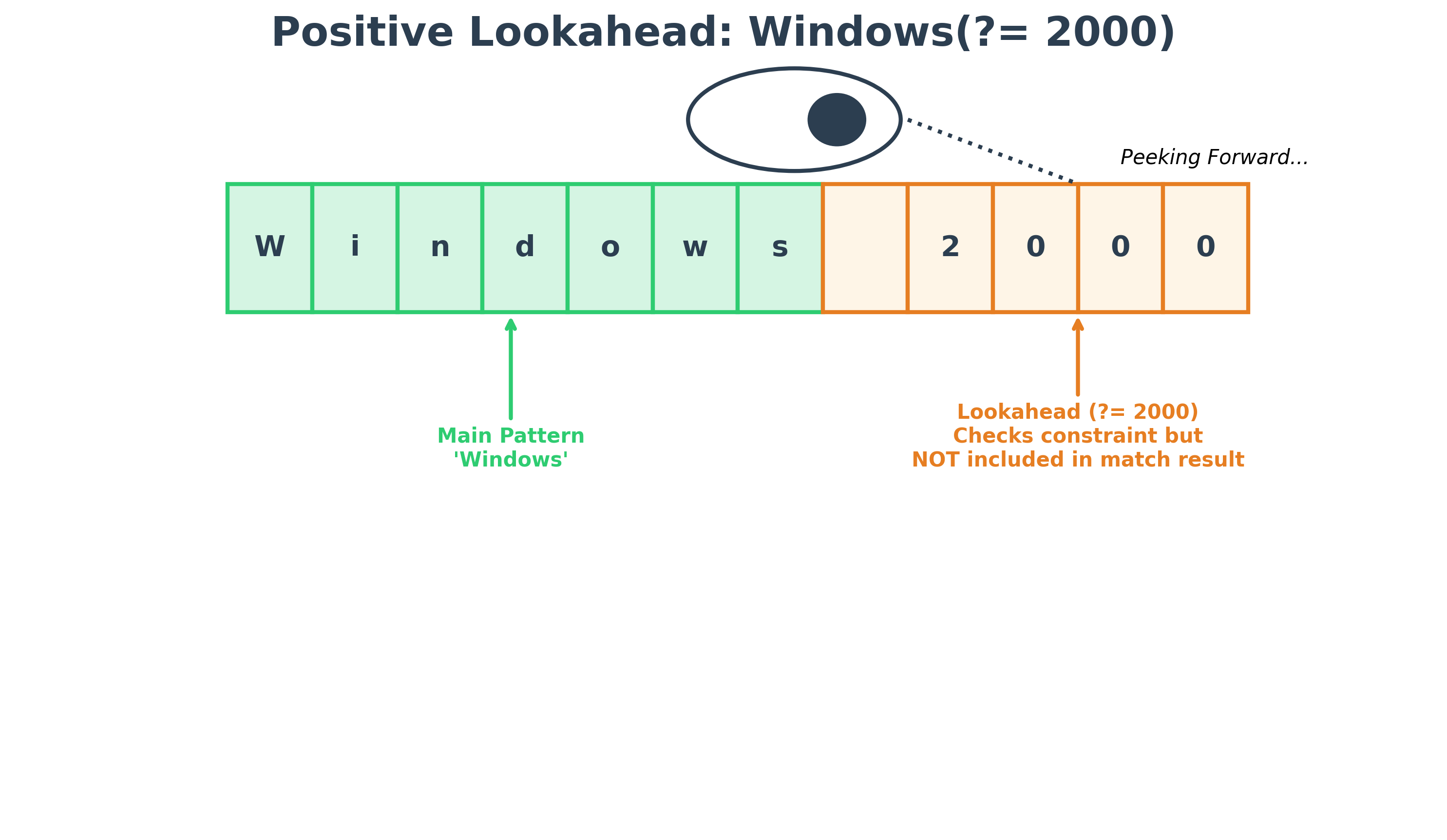
Lookahead assertions allow you to match a pattern only if it is (or is not) followed by another pattern. Lookaheads are zero-width, meaning they check the condition without "consuming" the characters in the match result.
- Positive Lookahead
(?=...): Matches only if the pattern is followed by the specified text. - Negative Lookahead
(?!...): Matches only if the pattern is NOT followed by the specified text.
Code Example
import re

sample_text = "Windows 2000, Windows 95, Windows NT"

# 1. Positive Lookahead: Match 'Windows' only if followed by ' 2000'
# Result is just 'Windows', the lookahead part is NOT consumed.
pos_matches = re.findall(r"Windows(?= 2000)", sample_text)
print(f"Positive Lookahead results: {pos_matches}")

# 2. Negative Lookahead: Match 'Windows' only if NOT followed by ' 95'
neg_matches = re.findall(r"Windows(?! 95)", sample_text)
print(f"Negative Lookahead results: {neg_matches}")
Output:
Positive Lookahead results: ['Windows'] Negative Lookahead results: ['Windows', 'Windows']
References
Hands-on Exercises
Exercise 1: Non-Digit Sanitizer
You have a messy customer-entered telephone field containing text and punctuation:
phone_raw = "Call (555) 019-2834 directly!"
Write a Python program to:
- Import the
remodule. - Use
re.sub()with the non-digit patternr"\D"to replace all non-digit characters with an empty string"". - Print the cleaned 10-digit phone number.
# Write your code below and click Run CodeClick to view Answer
import re

phone_raw = "Call (555) 019-2834 directly!"

# Replace non-digits (\D) with empty string
phone_clean = re.sub(r"\D", "", phone_raw)

print("Cleaned number:", phone_clean) # "5550192834"
Exercise 2: Extracting Log Errors
In data analysis, we often parse unstructured logs to find error codes. You have a single log string:
log_data = "INFO: User login success, ERROR: db connection timeout [code 998], INFO: page rendered, ERROR: write permissions denied [code 403]"
Write a Python program to:
- Search the log string using
re.findall()to extract all error codes wrapped inside brackets (e.g.[code 998],[code 403]). - Use a regex pattern that targets the numbers inside
[code ...]. Hint: User"\[code (\d+)\]"as the pattern. - Print the list of extracted error codes.
# Write your code below and click Run CodeClick to view Answer
import re

log_data = "INFO: User login success, ERROR: db connection timeout [code 998], INFO: page rendered, ERROR: write permissions denied [code 403]"

# The (\d+) group extracts just the digit part inside the brackets
error_codes = re.findall(r"\[code (\d+)\]", log_data)

print("Extracted Error Codes:", error_codes)
# Output: Extracted Error Codes: ['998', '403']