Tuples
Tuples are immutable collection of objects. As a result, tuple elements cannot be modified, deleted or inserted. Just like Lists, Tuples can also be used to represent a collection which may have heterogeneous values. Tuples are typically used to represent objects, which make sense as a whole, when all elements are together.
For example, in a class, if you have to represent the complete details of a student who scored the highest marks in the class, you could represent the student record as a tuple as shown below:
top_student = ("jane", "doe", 99, 21, "f")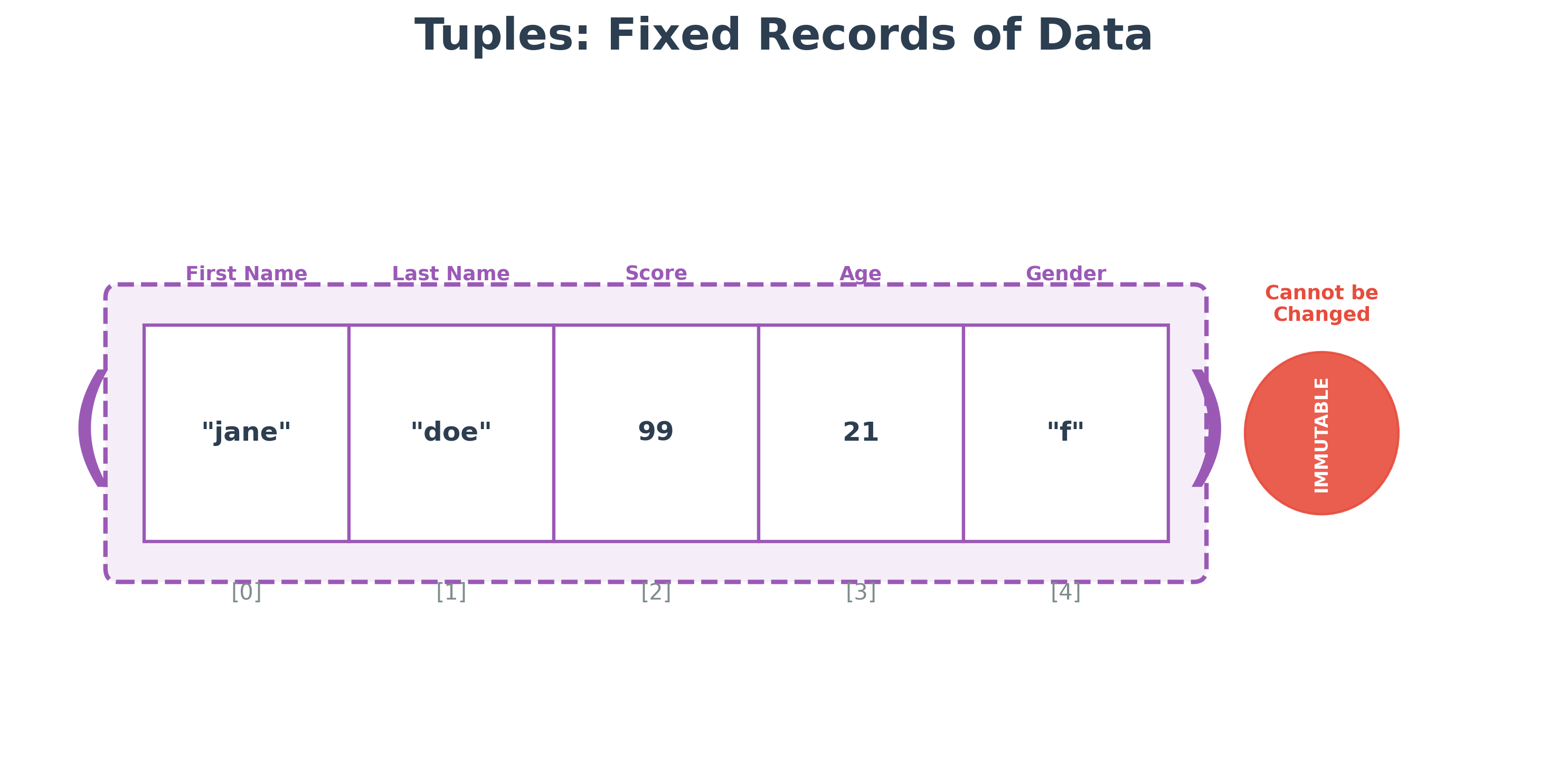
This tuple contains values for the student's first name, last name, total score, age and gender. This collection together make a record for one student even though each element is of different type. Since the values, though heterogeneous, represent one student with the highest score, you make a tuple representing the record.
Operation on tuples are similar to lists except, the modification operations are not allowed. Here is the run-down
| Operations | Example | Output | Comments |
|---|---|---|---|
| Positive positional index | top_student[0] | 'jane' | first position in the tuple |
| Negative positional index | top_student[-1] | 'f' | first position from the end. |
| Slicing | top_student[1:3] | ('doe', 99) | new tuple with numbers from position 1 (included) to 3 (excluded) |
| Slicing with start position default | top_student[:2] | ('jane', 'doe') | new tuple with numbers from from 0 index and 2nd position (excluded) |
| Slicing with end position default | top_student[2:] | (99, 21, 'f') | new tuple with numbers from position 2 to end of the tuple |
| Build in function len | len(top_student) | 5 | len can be applied to tuples also to obtain the size of the tuple |
Range
Range type represents an immutable sequence of numbers mostly used in for loops to help iterate a block of code a specific number of times.
range([start,]stop [,step])
start and step are optional.
start
Sequence starts from this value. 0 is the default when not supplied
step
The sequence of numbers are generated by incrementing the step value, starting from the start value.
stop
The sequence of numbers are generated up to the stop value but not including the stop value
Here are a few examples:
| Definition | Output | Comments |
|---|---|---|
| list(range(5)) | [0, 1, 2, 3, 4] | Total number is 5 but the last index number is 4 |
| list(range(1, 5)) | [1, 2, 3, 4] | Instead of starting at default 0, it starts at 1 since start number is given |
| list(range(0, 20, 5)) | [0, 5, 10, 15] | Since step is given, start should be given. Steps in increment of 5 - step value |
list(range(0, -5, -1)) |
[0, -1, -2, -3, -4] | Same rule applies for negative numbers as well |
Points to note
- Tuples are more efficient than lists. When ever the elements do not change, you should use tuples.
- Lists are not as popular for Data Analytics as NumPy Arrays or Pandas Series. NumPy and Pandas are Python libraries heavily used in Data Analytics. We use NumPy Array or Pandas Series in place of Python lists, as these data structures are more efficient for handling large datasets and also provide many convenient functions to use in analytics.
Hands-on Exercises
Exercise 1: Server Config Unpacking
You are managing a data storage server. Its configuration is saved in a read-only tuple:
server_config = ("db.company.com", 3306, "MySQL", "v8.0")
Write a Python program to:
- Initialize the
server_configtuple. - Unpack the tuple directly into four variables:
host,port,db_type, andversion. - Print a single statement displaying the host and the port (e.g.
"Connecting to db.company.com on port 3306").
# Write your code below and click Run CodeClick to view Answer
server_config = ("db.company.com", 3306, "MySQL", "v8.0")

# Unpacking the tuple
host, port, db_type, version = server_config

print("Connecting to", host, "on port", port)
# Output: Connecting to db.company.com on port 3306
Exercise 2: Sampling Indices Range
In data science, we often need to sample specific rows from a table (e.g. taking every 3rd row starting from 3 up to 30). Write a Python program to:
- Use the
range()function to generate a sequence of numbers starting at3, stopping at30(inclusive), with a step size of3. (Hint: The stop value inrange()is exclusive, so use31). - Convert the generated range object into a standard list using the
list()function. - Print the final list.
# Write your code below and click Run CodeClick to view Answer
# Generate sequence from 3 to 30 with steps of 3
target_range = range(3, 31, 3)

# Convert to list
indices = list(target_range)

print("Indices list:", indices)
# Output: [3, 6, 9, 12, 15, 18, 21, 24, 27, 30]