String Operations
In the first lesson, you learned about the String data type. A String holds text values and can be enclosed in single, double, or triple quotes. Triple quotes (single or double) are primarily used for strings that span multiple lines.
double_quote_word = "Python"
print(double_quote_word)

single_quote_word = 'Python'
print(single_quote_word)

multi_line_word = '''First line
  Second line'''  # White spaces are preserved
print(multi_line_word)

multi_line_word = """First line
  Second line"""  # Same as the triple-single-quote example
print(multi_line_word)
There are many operations you can perform on a String object.
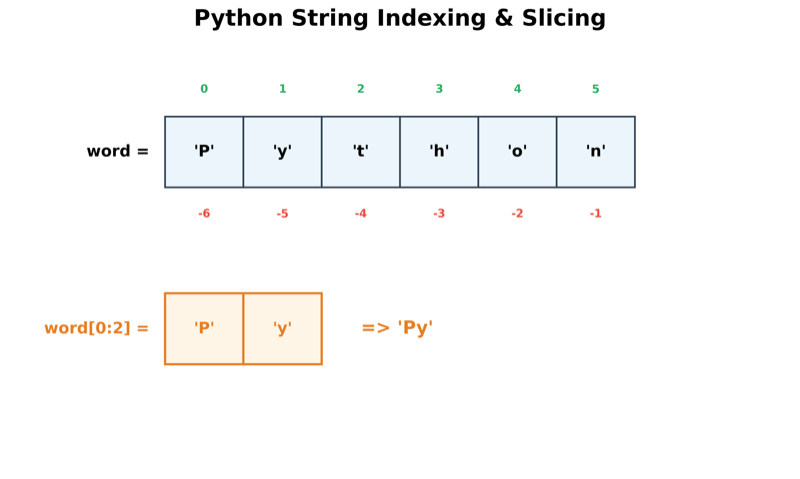
Here is a list of common operations using the variable word = 'Python':
| Operation | Example | Output | Comments |
|---|---|---|---|
| Positive positional index | word[0] |
'P' |
Indices start at 0 (first character). |
| Negative positional index | word[-1] |
'n' |
Retrieves from the end of the string. |
| Slicing | word[0:2] |
'Py' |
Characters from index 0 (inclusive) to 2 (exclusive). |
| Slicing (default start) | word[:2] |
'Py' |
Starts from 0 up to index 2 (exclusive). |
| Slicing (default end) | word[2:] |
'thon' |
Starts from index 2 to the end of the string. |
| Concatenation | "My " + word |
'My Python' |
Joins multiple strings using the + operator. |
Built-in len() |
len(word) |
6 |
Returns the total number of characters. |
- Immutability: Strings are immutable. Once created, they cannot be altered. All string operations return a new string. Assigning a value to an index (e.g.,
word[0] = 'K') results in an error. - IndexError: Accessing an index that is out of range (e.g.,
word[9]) will throw anIndexError. - Slice Range: Slicing an out-of-range position (e.g.,
word[9:12]) does not throw an error; it gracefully returns an empty string.
String Concatenation
You can join strings together using the plus (+) operator.
a = 'abc' + "def"
print(a) # Output: abcdef
However, you cannot directly add a string to other data types (like integers or Booleans).
a = 'abc' + 10 # Invalid
a = 'abc' + True # Invalid
To combine them, you must first convert the other data types using the str() function:
a = "abc" + str(10) + str(True)
print(a)  # Output: abc10True
String Special Cases
Sometimes you need to handle characters that have special meaning to the Python parser, such as quotes or newlines.
Quotes within Strings
If you need to include a quote inside a string:
- Enclose in opposite quotes: Use double quotes to wrap a string containing a single quote (e.g.,
"I'm having fun"). - Use Escape Sequences: Use a backslash (
\) to "escape" the character's special meaning.
Escape Sequences (\)
The backslash tells the interpreter to treat the following character as literal text rather than code.
# Escaping a single quote
message = 'I\'m having fun'
print(message)

# Other common escape sequences
print("a\tb")  # Adds a Tab
print("a\nb")  # Adds a Newline
Raw Strings
If you want to represent a string exactly as it is written (ignoring escape sequences), prefix it with r or R. This is very useful for file paths or regular expressions.
print(r"a\tb") # Output: a\tb (the \t is not treated as a tab)More Examples
| Code | Output | Notes |
|---|---|---|
print("Line 1 \nLine 2") |
Line 1 Line 2 |
The \n character breaks the line. |
print(r"C:\users\name") |
C:\users\name |
Raw string ensures backslashes are literal. |
print("hi" + " there") |
hi there |
Joins strings. |
print(3 * "yah! ") |
yah! yah! yah! |
Repeats the string. |
text = ("A" " B") |
AB |
Adjacent string literals in parentheses are joined automatically. |
Strings are a type of sequence. You can use the built-in str() function to convert any object into its textual representation.
Common String Methods
| Operation | Example | Output | Comments |
|---|---|---|---|
| str.split() | 'a,b,c'.split(',') |
['a', 'b', 'c'] |
Splits a string into a list based on a delimiter. |
| str.capitalize() | 'python'.capitalize() |
'Python' |
Uppercases the first letter. |
| str.count() | 'banana'.count('a') |
3 |
Counts occurrences of a substring. |
| str.endswith() | 'america'.endswith('ca') |
True |
Returns True if the string ends with the specified suffix. |
| str.find() | 'america'.find('me') |
1 |
Returns the index of the first occurrence, or -1 if not found. |
| str.lower() | 'PYTHON'.lower() |
'python' |
Converts to lowercase. |
| str.upper() | 'python'.upper() |
'PYTHON' |
Converts to uppercase. |
| str.join() | '-'.join(['a','b']) |
'a-b' |
Joins elements of an iterable into a single string. |
| in | 'ri' in 'america' |
True |
Checks if a substring exists within the string. |
Using the in Keyword in Conditionals
The in operator is a clean way to check for the presence of a substring within a larger string.
if "cat" in "caterpillar":
    print("Substring found!")
String Formatting
String formatting is the process of creating dynamic strings by inserting variables or expressions into a template. Instead of manually joining pieces of text with the + operator, formatting allows you to define placeholders within a string that are later filled with data. This makes your code cleaner and easier to maintain, especially when dealing with complex messages or specific numerical displays (like rounding decimals).
Python provides several ways to format strings. While the .format() method is common, f-strings (formatted string literals) are the modern standard introduced in Python 3.6.
F-strings (Modern Standard)
F-strings are preferred because they are more concise, easier to read, and faster than older methods. They allow you to embed expressions directly inside string literals by prefixing the string with f or F and using curly braces {} as placeholders.
name = "Jane"
age = 21
# Direct variable embedding
message = f"My name is {name} and I am {age} years old."
print(message)

# Expressions inside braces
data = {"first": "Jane", "last": "Doe"}
print(f"User: {data['first']} {data['last']}")
Numerical Formatting with F-strings
F-strings make it easy to format numbers for readability (e.g., adding comma separators or rounding decimals).
| Code | Example | Output | Comments |
|---|---|---|---|
| f | f'{3.14159:f}' |
'3.141590' |
Default float display (6 decimal places). |
| .2f | f'{4.347:.2f}' |
'4.35' |
Rounds to 2 decimal places. |
| 06.2f | f'{3.14159:06.2f}' |
'003.14' |
Minimum 6 characters, 2 decimals, zero-padded. |
| e | f'{3000:e}' |
'3.000000e+03' |
Exponent notation. |
| 10.2e | f'{3000:10.2e}' |
' 3.00e+03' |
Exponent notation, minimum 10 characters. |
| d | f'{52:04d}' |
'0052' |
Decimal integer, zero-padded to 4 digits. |
| d | f'{52: d}' |
' 52' |
Leaves a leading space for positive numbers. |
| +d | f'{52:+4d}' |
'+ 52' |
Displays the sign (+ or -) and pads to 4 characters. |
| , | f'{1234567:,}' |
'1,234,567' |
Adds a comma thousands separator. |
Conversion Codes
The following codes can be used inside the {} placeholders:
- s: String
- d: Decimal integer (base-10)
- f: Floating point
- c: Character
- b: Binary
- o: Octal
- x / X: Hexadecimal (lowercase/uppercase)
- e: Exponent notation
Note: For floating-point numbers, use
f. For whole numbers, used. You can combine these with commas for thousands separators.
The .format() Method (Legacy)
Before f-strings, the .format() method was the standard. It works by placing {} placeholders in a string and passing values as arguments.
Syntax: str.format(arguments)
| Example | Output | Comments |
|---|---|---|
'{}, Welcome'.format('Hi') |
'Hi, Welcome' |
{} is replaced with the argument. |
'My age is {}'.format(21) |
'My age is 21' |
Number is converted to string. |
'{}, welcome to {}'.format('Jo', 'Python') |
'Jo, welcome to Python' |
Multiple placeholders. |
"{1} and {0}".format("Java", "Python") |
'Python and Java' |
Index-based replacement. |
"{} and {lang}".format("Java", lang='Python') |
'Java and Python' |
Keyword arguments after positional. |
'{x}{y}'.format(x='abc', y='xyz') |
'abcxyz' |
Named placeholders. |
data = {'f': 'Jane', 'l': 'Doe'}'{f} {l}'.format(**data) |
'Jane Doe' |
Unpacking a dictionary. |
data = (10, 20)'{d[0]} {d[1]}'.format(d=data) |
'10 20' |
Indexing a tuple or list. |
coord = (5, 8) 'X: {0[0]}; Y: {0[1]}'.format(coord) |
'X: 5; Y: 8' |
Complex tuple indexing. |
- For more advanced examples, refer to the Official Python Formatting Documentation.
Hands-on Exercises
Exercise 1: Metric Reporter (f-strings)
You are building an automatic report generator for marketing metrics.
- Campaign Name:
"winter_sale" - Clicks:
12500 - Conversion Rate:
3.4567(in percent)
Write a Python program using f-strings to print the following output:
Campaign 'Winter Sale' generated 12,500 clicks with a 3.46% conversion rate.
- Store the metrics in variables.
- Format the campaign name to title case (
.title()). - Replace the underscore with a space (
.replace("_", " ")). - Format the conversion rate to show exactly 2 decimal places (e.g.
:.2f). - Print the formatted message.
# Write your code below and click Run CodeClick to view Answer
campaign = "winter_sale"
clicks = 12500
conv_rate = 3.4567

# Format and replace
clean_name = campaign.replace("_", " ").title()

# Using f-string formatting
message = f"Campaign '{clean_name}' generated {clicks:,} clicks with a {conv_rate:.2f}% conversion rate."
print(message)
# Output: Campaign 'Winter Sale' generated 12,500 clicks with a 3.46% conversion rate.
Exercise 2: Serial Code Sanitization
You receive messy inputs from database imports:
serial_raw = " \t sn-992a-01B\n "
Write a Python program to:
- Strip all leading and trailing whitespaces, tabs, and newlines (
.strip()). - Convert the entire string to uppercase (
.upper()). - Check and print if the cleaned string starts with the prefix
"SN-"(.startswith()). - Print the final cleaned string.
# Write your code below and click Run CodeClick to view Answer
serial_raw = "   \t sn-992a-01B\n   "

# 1. Strip
clean_serial = serial_raw.strip()

# 2. Upper case
clean_serial = clean_serial.upper()

# 3. Check prefix
is_valid_prefix = clean_serial.startswith("SN-")

print("Cleaned Serial:", clean_serial) # "SN-992A-01B"
print("Has valid prefix:", is_valid_prefix) # True