Loops
When you need to execute statements multiple times, you can use a loop construct to repeat a block of code. Python provides two primary loop structures: the for loop and the while loop.
The for loop
The for statement is used to repeat a block of code a predetermined number of times. It is designed to work with sequences, such as a range of numbers, a list, a tuple, a dictionary, a set, or a string.
Iterating with range()
Here is an example of a for loop using the range() function:
for x in range(3):
    # Executes the statement 3 times (for 0, 1, and 2)
    print(f"This is really fun! Value of x={x}")
Output:
This is really fun! Value of x=0 This is really fun! Value of x=1 This is really fun! Value of x=2
Iterating Other Constructs
Lists
The example below shows a for loop iterating through a list:
scores = [50, 80, 90, 100]
for score in scores:
    print(score)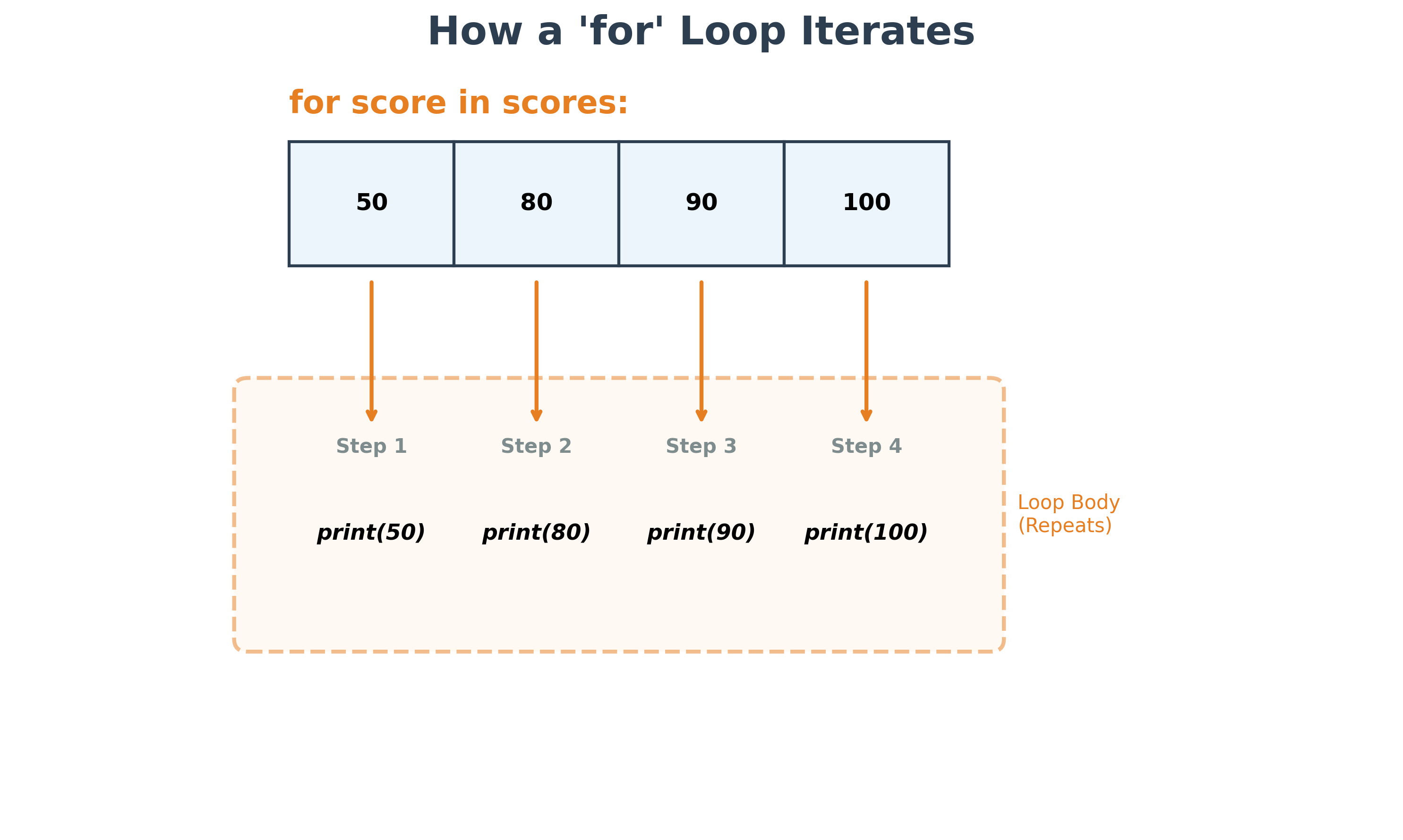
Strings You can also iterate through each character in a string:
language = "Python"
for letter in language:
    print(letter)
Multidimensional Lists Looping over a list of lists:
multi_list = [
     [1, 2, 3],
     [4, 5, 6],
     [7, 8, 9]
     ]
for sub_list in multi_list:
    print(sub_list)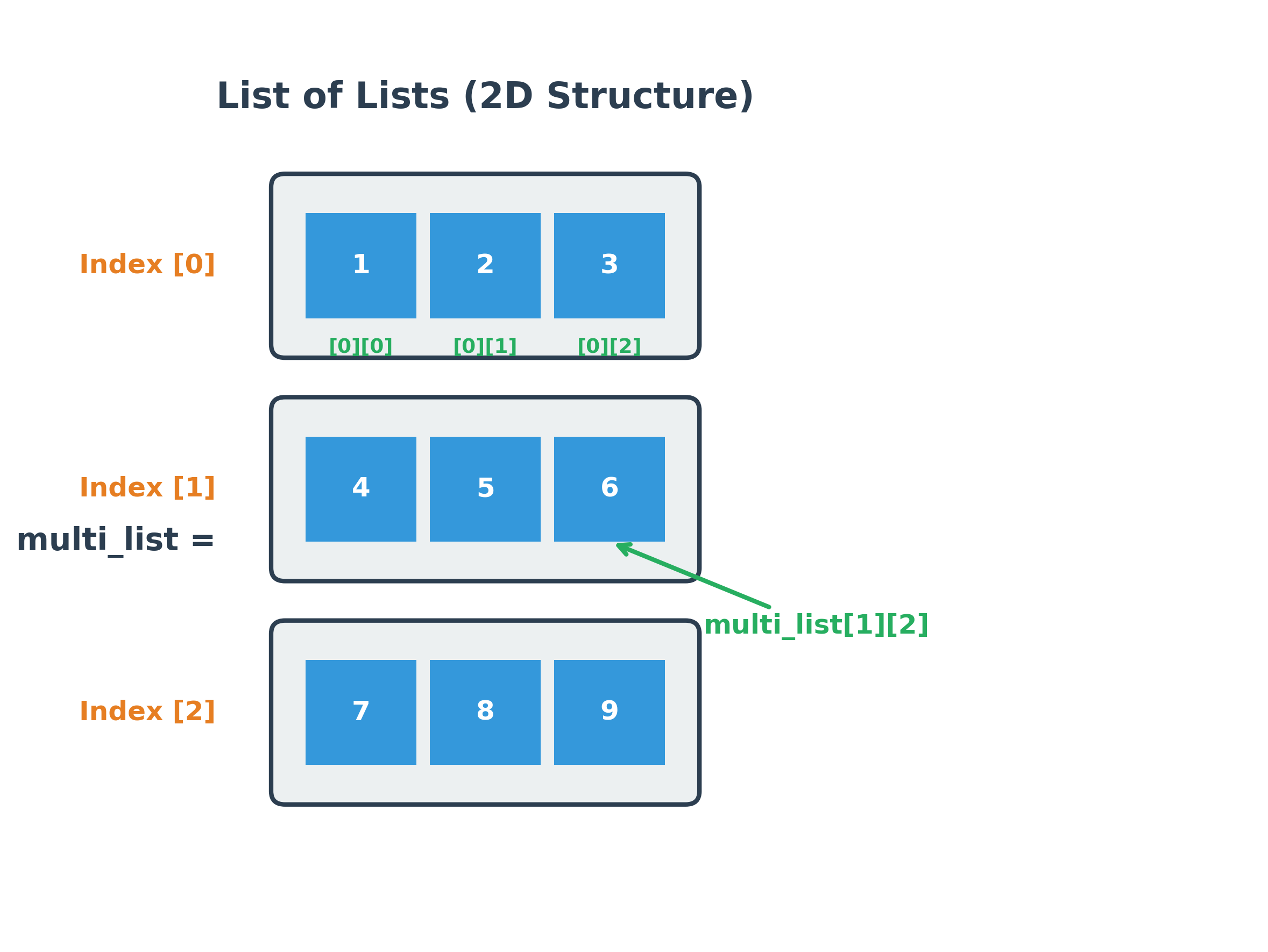
The while loop
The while statement repeats a set of statements as long as a specific condition remains True:
repeat = True
while repeat:
    user_input = input(
        "Please input anything to continue. "
        "If you want to quit, input 'quit' in lowercase \n"
    )
    print(f'Your input is "{user_input}"')
    if user_input == "quit":
        print("OK, have a good day!")
        repeat = False  # Loop stops here as the condition becomes False
In this example, the variable repeat is initialized to True. The while loop checks the condition before every iteration. If the condition is True, the indented block is executed. This process repeats until the condition evaluates to False.
Here, the user is prompted for input in every iteration. If the user enters "quit", repeat is set to False, and the loop terminates.
- Infinite Loops: Always exercise caution with
whileloops. If the condition never becomesFalse, the loop will run forever, consuming your computer's processing power. - Execution Indicator: When a block of code is running in a Jupyter Notebook, you will see an asterisk (*) in the sidebar.
Optional else Statement
You can use an optional else statement with both for and while loops. The else block executes once the loop finishes naturally (when the condition becomes False for while, or when the sequence is exhausted for for).
for x in range(3):
    print(x)
else:
    print(f"Loop finished. Final value of x = {x}")
break statement
The break statement allows you to exit a loop prematurely, even if the loop condition is still True or the sequence has not been fully iterated.
multi_list = [
     [1, 2, 3],
     [4, 5],
     [7, 8, 9]
     ]
for sub_list in multi_list:
    print(sub_list)
    if len(sub_list) == 2:
        break  # Exit the loop immediately
Output:
[1, 2, 3] [4, 5]
continue statement
The continue statement skips the remaining code inside the current iteration and jumps immediately to the next iteration of the loop.
fruits = [
    "apple",
    "orange",
    "banana",
    "kiwi",
    "grapes",
    "watermelon",
    "blueberries",
    "mandarin",
    "grapefruit",
]
my_list = []

for fruit in fruits:
    if fruit.startswith("b"):
        continue  # Skip fruits starting with 'b'
    my_list.append(fruit)
print(my_list)
Output:
['apple', 'orange', 'kiwi', 'grapes', 'watermelon', 'mandarin', 'grapefruit']
enumerate() function
The enumerate() function is a convenient way to get both the index and the element while iterating through a collection.
my_list = [10, 20, 30, 40]
for index, value in enumerate(my_list):
    print(f"Index: {index}, Value: {value}")
If you want to access the index and element together as a tuple, you can do so like this:
my_set = {("a", 1), ("b", 2), ("c", 3)}
for item in enumerate(my_set):
    print(item)
Alternatively, you can unpack the index and element directly into separate variables:
for i, j in enumerate(my_set):
    print(f"Index: {i}, Element: {j}")
In these examples, the first variable (index or i) represents the count, and the second variable (value or j) represents the individual element.
You can use enumerate() with lists, tuples, sets, strings, and even zip objects (which you will learn about in the next lesson).
List Comprehension
List comprehension provides a concise way to create new lists based on existing sequences. It consists of an expression followed by a for clause and optional if clauses.
Example: Multiply all even numbers from 1 to 9 by 3 and store them in a new list.
# Concise version using list comprehension
my_list = [num * 3 for num in range(1, 10) if num % 2 == 0]
print(my_list)
Traditional version (without comprehension):
my_list = []
for num in range(1, 10):
    if num % 2 == 0:
        my_list.append(num * 3)
print(my_list)
The only caveat is that you can use this construct only if the expression is not a compound statement. Also, the program above can be made even more concise by removing the if block completely, as shown below; the previous example was provided specifically to show how to build a list comprehension with an if condition.
my_list = []
for num in range(0, 10, 2):
    my_list.append(num * 3)
print(my_list)
Reference: Python Documentation on List Comprehensions
Dictionary Comprehension
Similarly, you can create dictionaries using a concise comprehension syntax.
d1 = {"a": 1, "b": 5, "c": 10}

# Create a new dictionary by reversing keys and values
d2 = {value: key for key, value in d1.items()}
print(d2)
Output:
{1: 'a', 5: 'b', 10: 'c'}
Hands-on Exercises
Exercise 1: Countdown Timer (while loop)
Write a Python program to print a countdown from 5 to 1 using a while loop.
- Initialize a variable
count = 5. - Write a
whileloop that runs as long ascountis greater than 0. - Inside the loop, print the current value of
count, then decrementcountby 1. - After the loop exits, print
"Blast off!".
# Write your code below and click Run CodeClick to view Answer
count = 5

while count > 0:
    print(count)
    count -= 1

print("Blast off!")
Exercise 2: Filter Active Subscribers (List Comprehension)
You have a list of user profiles, each containing a username and a boolean active status:
users = [("alice", True), ("bob", False), ("charlie", True), ("david", False)]
Write a Python program to:
- Initialize the
userslist. - Use a list comprehension to filter the list and create a new list containing only the usernames (the first item in the tuple) of users who are active (status is
True). - Print the resulting list of active users.
# Write your code below and click Run CodeClick to view Answer
users = [("alice", True), ("bob", False), ("charlie", True), ("david", False)]

# List comprehension filtering active users
active_users = [username for username, is_active in users if is_active]

print("Active Users:", active_users)
# Output: Active Users: ['alice', 'charlie']