Relational Database Management Systems (RDBMS)
A program that facilitates the creation, maintenance, and interaction with a relational database is called a Relational Database Management System (RDBMS). These systems manage the underlying data storage, enforce data integrity, and provide the tools for querying and manipulation.
RDBMSs can be broadly categorized into two main types: server-based systems and embedded systems.
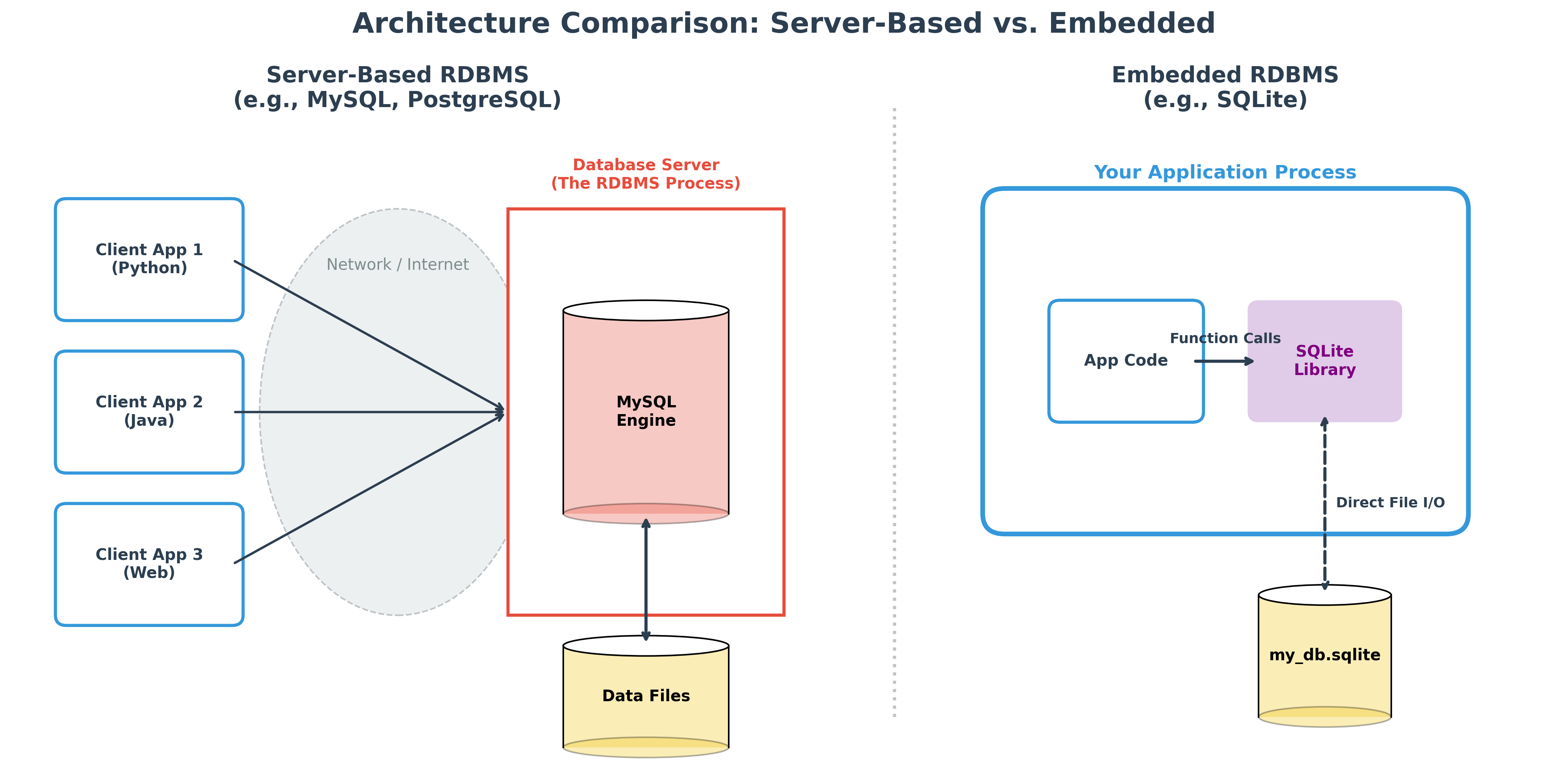
Server-Based RDBMS (e.g., Oracle, MySQL, PostgreSQL)
These are powerful, standalone database systems that operate on a client-server model.
- Architecture: The RDBMS runs as a separate, continuously running process (often called a service or daemon) on a server. Applications, which can be on the same machine or on different machines, act as "clients" that connect to this database server over a network.
- Concurrency: They are designed to handle connections from many clients simultaneously, managing complex locking mechanisms to ensure data consistency during concurrent read and write operations.
- Use Cases: This architecture is the standard for enterprise-level applications, web backends, and any system that requires a centralized, shared data store for multiple users or services.
- Examples:
- Proprietary: Oracle, Microsoft SQL Server, IBM Db2
- Open-Source: MySQL, PostgreSQL
These systems are built for scalability, security, and robustness, capable of managing enormous databases (terabytes or even petabytes) and high transaction volumes.
Embedded RDBMS
Embedded databases are fundamentally different from server-based systems. Instead of being a standalone program that applications connect to, the database engine is a library that is integrated directly into the application itself.
Architecture: These systems are "serverless." They do not run as a separate process; instead, the database logic is part of the application code. The data is typically stored as a single file on the local disk or even entirely in memory.
Concurrency: Because the database is often just a file on disk, concurrency is generally more limited. While many embedded systems can handle multiple simultaneous readers, write operations often require locking the entire database, making them less suitable for high-traffic web applications with many simultaneous writers.
Use Cases: Their lightweight, "zero-configuration" nature makes them ideal for:
- Mobile & Desktop Apps: Storing local user data, settings, or document contents (e.g., Android, iOS, or web browsers).
- Internet of Things (IoT): Running on low-power devices where a full database server would be too resource-heavy.
- Development & Testing: Providing a fast, temporary database that doesn't require a complex setup.
- Data Analysis: Performing fast analytical queries on local datasets without needing a network connection.
Examples:
- SQLite: The global standard for mobile and desktop applications; known for its extreme reliability and simplicity.
- DuckDB: A modern embedded RDBMS optimized for analytical (OLAP) workloads and data science.
- H2 Database / Apache Derby: Common Java-based embedded databases used heavily in the Java ecosystem.
- Firebird (Embedded): A version of the Firebird RDBMS that can be deployed as a single library file.
Connecting to an RDBMS: Clients and Tools
To interact with a database, especially server-based ones, you need a client. A client is any application that connects to the RDBMS to send commands and receive results. There is a rich ecosystem of clients available, catering to different needs.
1. Command-Line Interfaces (CLIs)
These are text-based tools that allow you to type SQL commands directly. They are fast, powerful, and excellent for scripting and automation.
mysql: The standard command-line client for MySQL.psql: The feature-rich command-line client for PostgreSQL.sqlcmd: The command-line client for Microsoft SQL Server.sqlite3: The command-line tool for SQLite, allowing you to interact with a database file.
2. Graphical User Interfaces (GUIs)
GUI clients provide a visual way to interact with the database. They are user-friendly and great for exploring schemas, building queries with visual aids, and managing administrative tasks.
- DBeaver: A universal, open-source database tool that can connect to almost any RDBMS.
- MySQL Workbench: The official visual tool for MySQL, offering database design, development, and administration.
- pgAdmin: The most popular open-source administration and development platform for PostgreSQL.
- SQL Server Management Studio (SSMS): The official, comprehensive tool for managing Microsoft SQL Server.
- DB Browser for SQLite: A simple, open-source tool for creating, designing, and editing SQLite database files.
3. Application Connectors and Drivers
When you write code in a programming language like Python, Java, or C#, you don't use a CLI or GUI. Instead, you use a specific library or driver that knows how to communicate with the database.
- Python:
sqlite3(built-in),psycopg2(for PostgreSQL),mysql-connector-python(for MySQL). - Java: JDBC (Java Database Connectivity) drivers are available for virtually every database.
- General: ODBC (Open Database Connectivity) provides a standard software API for accessing database management systems.
We'll use Python's built-in sqlite3 connector in this guide because it is incredibly easy to get started with, requiring no separate installation or server management.