Introduction to Databases
A database is a collection of information that is organized to make retrieval fast and efficient. Think of it as a digital filing cabinet, but one that is structured in a way that allows you to find, cross-reference, and analyze information with incredible speed.
The Importance of Organization
Imagine trying to find a specific book in a massive library where all the books are just thrown into one big pile. It would be a nightmare. Databases solve this problem by imposing a structure on the data.
For example, a simple database for a product inventory might store not just the product name, but also its price, the quantity in stock, and the supplier's ID. By storing these pieces of information in separate, defined fields, the database can quickly answer questions like:
- "How many units of 'Product X' do we have?"
- "Which products cost more than $50?"
- "Show me all products from 'Supplier Y'."
A Simple Example: A Library Database
This course focuses on relational databases. The core idea is to store data in tables, which are made up of rows and columns.
Let's consider a simple table for a library database called Books:
| BookID | Title | Author | Genre | PublishedYear |
|---|---|---|---|---|
| 1 | The Hobbit | J.R.R. Tolkien |
Fantasy | 1937 |
| 2 | 1984 | George Orwell | Dystopian | 1949 |
| 3 | The Fellowship of the Ring | J.R.R. Tolkien |
Fantasy | 1954 |
| 4 | Dune | Frank Herbert | Sci-Fi | 1965 |
With this organized structure, we can easily and efficiently retrieve information. For example, if we want to find all books written by J.R.R. Tolkien, we just need to look for rows where the Author column has a value:
'J.R.R. Tolkien'.
What Makes a Database "Relational"?
The true power of a relational database comes from the "relations" between tables. Storing everything in one giant table is inefficient and prone to errors. Instead, we break down the data into multiple, related tables.
Let's improve our library example. We can create a separate table just for authors:
Authors Table
| AuthorID | AuthorName | Nationality |
|---|---|---|
| 101 | J.R.R. Tolkien |
British |
| 102 | George Orwell | British |
| 103 | Frank Herbert | American |
Now, we can modify our Books table to simply refer to the author's ID instead of repeating their name every time.
Books Table (Modified)
| BookID | Title | AuthorID | Genre | PublishedYear |
|---|---|---|---|---|
| 1 | The Hobbit | 101 |
Fantasy | 1937 |
| 2 | 1984 | 102 | Dystopian | 1949 |
| 3 | The Fellowship of the Ring | 101 |
Fantasy | 1954 |
| 4 | Dune | 103 | Sci-Fi | 1965 |
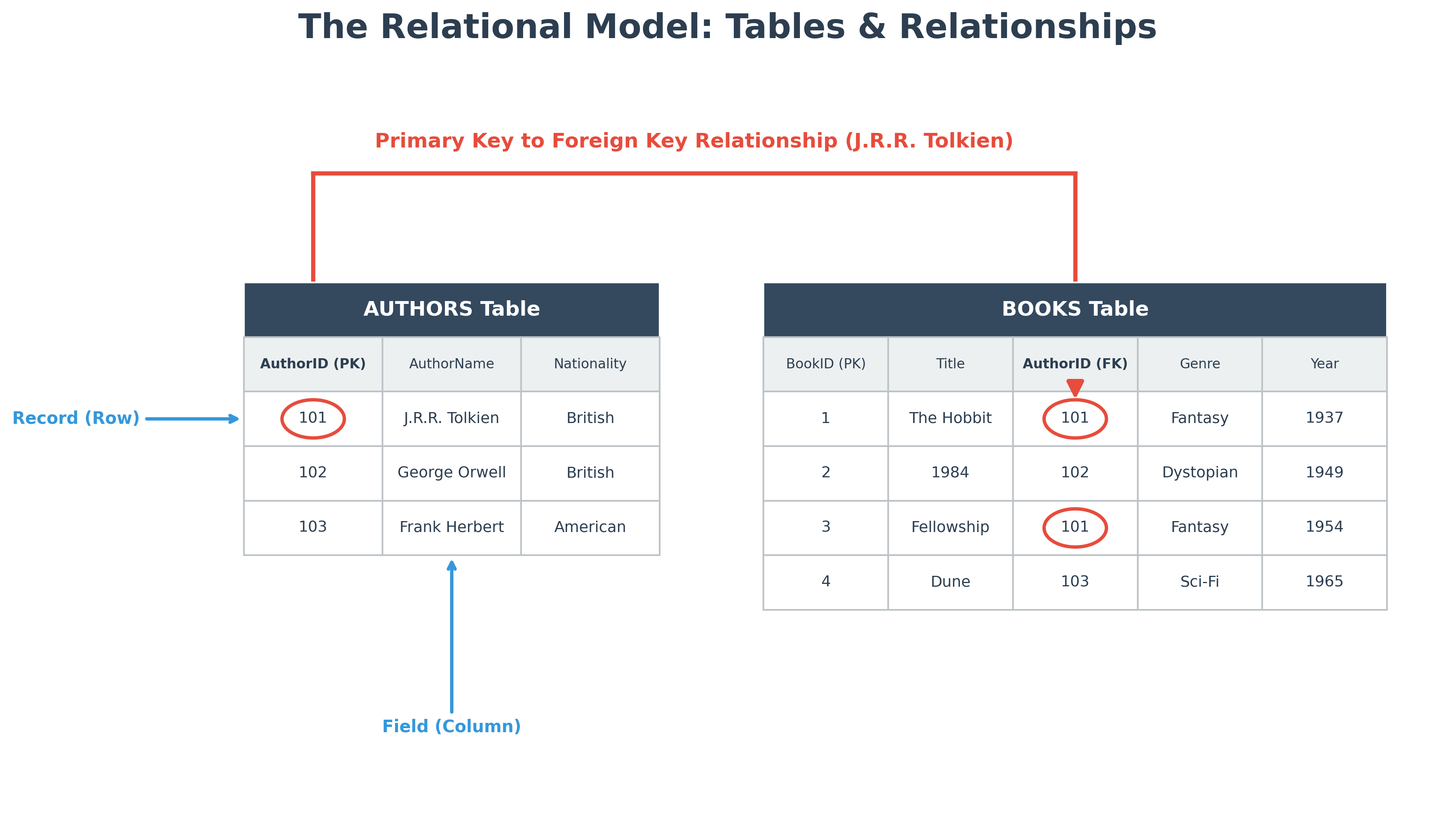
This link is the relation. The AuthorID in the Books table is a foreign key that points to the AuthorID primary key in the Authors table. This structure has several key advantages:
- Reduces Redundancy: We no longer repeat "J.R.R. Tolkien" for every book he wrote. His name is stored only once. If we needed to correct a typo in his name, we would only have to change it in one place.
- Ensures Data Integrity: It prevents errors. For example, it's now impossible to accidentally misspell an author's name for one book but not another.
- Powerful Queries: We can now ask more complex questions by combining, or joining, these tables. For instance: "Show me the titles of all books written by British authors." The database would first look at the
Authorstable to find all authors with the nationality 'British' (Tolkien and Orwell), and then use theirAuthorIDs (101 and 102) to find their corresponding books in theBookstable.
This ability to model relationships between different pieces of data is the defining feature of relational databases.
Database Models
Relational databases have been the dominant model since the 1970s, but other models exist, such as:
- Object-oriented databases
- Hierarchical databases
- NoSQL databases (which we will cover later)
Further Reading:
- Relational database on Wikipedia
- Database model on Wikipedia
- Textbook: Database System Concepts by Silberschatz, Korth and Sudarshan.