Sets
A Set is an unordered collection with no duplicate elements. You can create a set using curly braces { } or the built-in set() function. To create an empty set, you must use set(), as { } is reserved for creating an empty dictionary.
Example:
americas = {"Canada", "United States", "Mexico", "Mexico"}
print(americas)
Output:
{'United States', 'Canada', 'Mexico'}
Notice that the duplicate 'Mexico' was automatically removed. The order of elements in the output may differ from the example because sets are unordered. If you need to maintain a specific sequence, use an ordered collection like a list or tuple.
Constructing Sets
You can create a set from other collections using the set() function.
From a List:
americas = set(["Canada", "United States", "Mexico"])
print(americas)
From a Tuple:
americas = set(("Canada", "United States", "Mexico"))
print(americas)
From a String:
If you pass multiple strings without separators to set(), it treats them as a single combined string and breaks them into individual unique characters.
# Note the lack of commas between strings
letters = set("Canada" "Mexico")
print(letters)
Output:
{'M', 'd', 'a', 'i', 'x', 'o', 'n', 'C'}
Set Operations
| Operation | Example | Result | Comments |
|---|---|---|---|
| add() | americas.add('Puerto Rico') |
{'USA', 'Canada', 'Puerto Rico'} |
Adds a single element. |
| update() | americas.update(('PR', 'Cuba')) |
{'USA', ..., 'PR', 'Cuba'} |
Adds multiple elements. |
| remove() | americas.remove('PR') |
{'USA', 'Canada'} |
Removes an element. Raises error if not found. |
| discard() | americas.discard('PR') |
{'USA', 'Canada'} |
Removes an element. No error if not found. |
| pop() | americas.pop() |
(Random element) | Removes and returns an arbitrary element. |
| clear() | americas.clear() |
set() |
Empties the set. |
Operations Between Two Sets
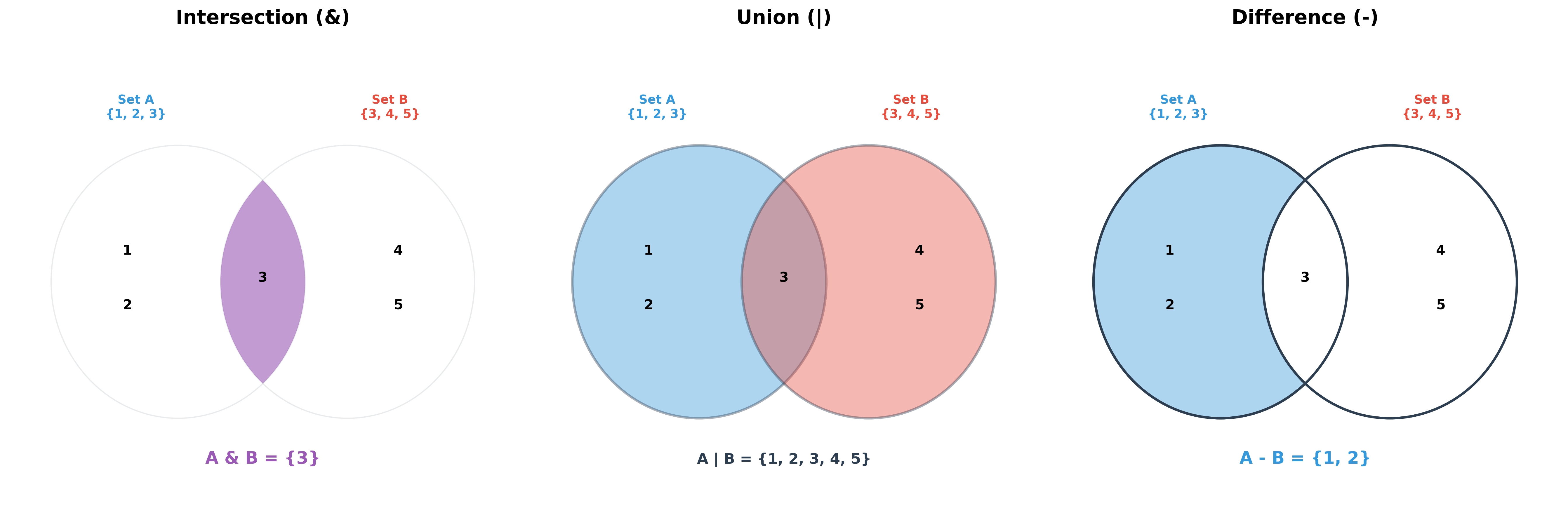
Let's consider another set of countries:
old_eng_col = {"Canada", "India", "Australia", "United States"}| Operation | Symbol / Method | Result | Comments |
|---|---|---|---|
| Intersection | & or .intersection() |
{'USA', 'Canada'} |
Elements common to both sets. |
| Union | | or .union() |
{'USA', 'India', ...} |
All unique elements from both sets. |
| Difference | - or .difference() |
{'Mexico'} |
Elements in first set but not in the second. |
| Is Subset | .issubset() |
False |
Checks if one set is contained within another. |
Here are a few more functions on sets:
- copy(): Returns a copy of the set.
- difference_update(): Removes items from this set that are also present in another set.
- intersection_update(): Removes items from this set that are NOT present in another set.
- isdisjoint(): Returns whether two sets have a null intersection.
- issubset(): Returns whether another set contains this set.
- issuperset(): Returns whether this set contains another set.
- symmetric_difference(): Returns a set with the symmetric differences of two sets.
- symmetric_difference_update(): Inserts the symmetric differences from this set and another.
Common Operations Across All Collections
Most collection types share common utility functions:
codes = {"US": "USA", "CA": "Canada"}  # Dictionary
a_list = [10, 4, 1, 11]  # List
a_tuple = (5, 1, 9, 5)  # Tuple
a_set = {5, 9, 1} # Set| Operation | Example | Output | Comments |
|---|---|---|---|
| sorted() | sorted(codes) |
['CA', 'US'] |
Returns a sorted list of keys. |
| sorted() | sorted(a_list) |
[1, 4, 10, 11] |
Returns a new sorted list. |
| sorted() | sorted(a_tuple) |
[1, 5, 5, 9] |
Returns a list, even for tuple input. |
| sorted() | sorted(a_set) |
[1, 5, 9] |
Returns a sorted list from a set. |
There are many other functions like sorted() that can be applied across all collection types, including len() (size), min() (minimum), and max() (maximum). For dictionaries, these operations are performed on the keys.
Unpacking Collections
Elements of any collection (lists, tuples, sets) can be unpacked directly into variables. This is useful for assigning multiple values at once:
student = ("Jane", "Doe", 21, "F")
first, last, age, gender = student
print(first)  # Output: Jane
The same operation works on lists and sets. For dictionaries, unpacking only retrieves the keys.
Hands-on Exercises
Exercise 1: Finding Unique Email Domains
In data analysis, we often need to filter out duplicates. You have a list of email domains with duplicates:
domains = ["gmail.com", "yahoo.com", "gmail.com", "hotmail.com", "yahoo.com"]
Write a Python program to:
- Initialize the
domainslist. - Convert it into a Set to remove all duplicates.
- Calculate and print the number of unique domains in the set.
# Write your code below and click Run CodeClick to view Answer
domains = ["gmail.com", "yahoo.com", "gmail.com", "hotmail.com", "yahoo.com"]

# Convert to set to remove duplicates
unique_domains = set(domains)

print("Unique Domains:", unique_domains)
print("Count of unique domains:", len(unique_domains))
# Output: Count of unique domains: 3
Exercise 2: Active User Comparison
You are auditing user accounts across two applications:
- App A Users:
app_a = {"user1", "user2", "user3", "user4"} - App B Users:
app_b = {"user3", "user4", "user5", "user6"}
Write a Python program to find:
- Users registered in both apps (Intersection).
- All unique users across both apps combined (Union).
- Users who are registered in App A but not in App B (Difference).
# Write your code below and click Run CodeClick to view Answer
app_a = {"user1", "user2", "user3", "user4"}
app_b = {"user3", "user4", "user5", "user6"}

# 1. Intersection
print("Registered in both:", app_a & app_b) # {'user3', 'user4'}

# 2. Union
print("All unique users:", app_a | app_b) # {'user1', 'user2', 'user3', 'user4', 'user5', 'user6'}

# 3. Difference
print("Only in App A:", app_a - app_b) # {'user1', 'user2'}