Functions and Modules
We have already used the print() function in the last chapter. For example:
print("hello")
This function takes one argument ("hello"), and calling it prints the value hello to the console. This function is part of the Python programming language, also known as a built-in function, and we simply use it.
Let us now understand the fundamental concept of a function, starting with understanding what a compound statement is.
Understanding Statements
Compound Statements
So far, you have studied simple statements in Python. A simple statement consists of a single line of code that has no logic control relation to other statements. Simple statements are standalone and syntactically correct to use individually. When your program consists only of simple statements, the interpreter runs them one at a time in a sequence, and once all are executed, the program exits.
However, you can change this sequential pattern of execution using Control Statements and/or Functions. You will learn more about Control Statements in the next chapter and more about functions in this chapter. Compound statements contain other statements and control when or if those statements are executed.
What is a function?
A function is a reusable block of code consisting of one or more Python statements which are invoked together as a sequence of instructions when the function is called. If a function is defined with parameters, then you must invoke it with the necessary arguments.
To define a function, you use the def keyword followed by the name of the function, an optional parameter list, and a colon, followed by the full implementation of the function. You invoke (call) the function by using its name followed by a pair of parentheses that contain optional arguments.
If the function returns a value, you typically receive that by declaring a variable to hold it or pass it as an input to another function.
User-Defined Functions
A function that a programmer creates is called a User-Defined Function. This is in contrast to the built-in functions that are released with the programming language, like the print() function.
Here is an example of an imaginary user-defined function named add which receives two inputs (2 and 3) and returns 5 when it is invoked.
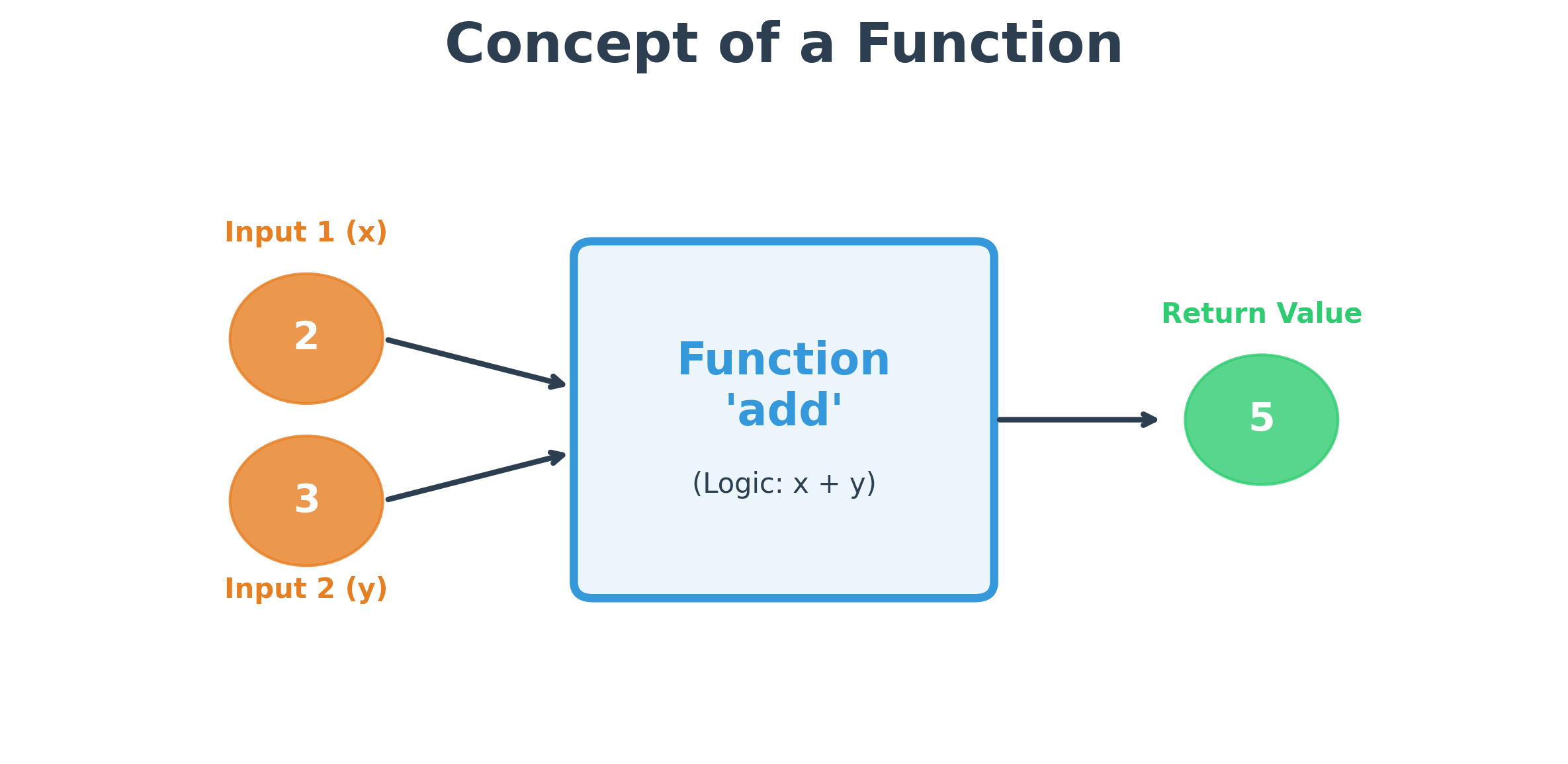
The Python code for defining and invoking the function add is shown below. A function should be defined first using the def keyword. Every statement within the definition should be indented with the same space, signifying all the statements that are executed when the function is called.
# function definition
def add(x, y):
    return x + y


# function invocation
b = add(2, 3)
print(b)
The above function add returned a value using the return keyword. This is why the variable b will have the result of adding 2 + 3.
Try this: Remove the return keyword and notice what gets printed on the console. Keep reading to learn why that happens!
Function Definition With No Arguments
Here is a function named print_greetings that takes no arguments and does not return anything:
def print_greetings():
    print("Hi there!")


print_greetings()
And here is an example of a function that also takes no arguments but returns a value when called. This function, get_pi_value, simply returns the value of Pi:
def get_pi_value():
    return 3.14159


pi = get_pi_value()
print(pi)
Function Definition With Arguments and Return Statement
We already saw this pattern earlier with the add function above. Let's see another example of a function definition that takes arguments and returns a value. This function, calculate_triangle_area, receives two input parameters: the base and the height.
def calculate_triangle_area(base, height):
    area = (base * height) / 2
    return area
The only keyword you might not have seen yet is return. You use the return keyword to pass something from the function back to the calling statement.
Once defined, you can invoke this function as many times as you want with different arguments:
area = calculate_triangle_area(10, 12)
print(area)
When the execution hits a return statement, the program exits the function call, and any statements after the return are not executed.
Note on Arguments: This function is defined to receive two arguments. If you do not provide the required arguments, you will get a TypeError:
TypeError: calculate_triangle_area() missing 2 required positional arguments: 'height' and 'base'
- The
defkeyword is used to define a function. - A function must be defined before it is invoked.
- A function is a block of code which can be called by the same or different programs.
- A function can take zero or more arguments, provided the corresponding parameters are defined.
Function With No Return (None)
If a function does not return anything, the variable that tries to receive the returned value will have a None value (which belongs to the NoneType).
def display_greetings(name):
    print(f"Greetings! {name}, hope you are having a good day.")


a = display_greetings("Foo")
print(type(a))  # Output: <class 'NoneType'>
Even the built-in print() function returns None:
a = print("Z")
print(a)  # Output: None
Difference Between Argument and Parameter
- Parameters are the variable names defined in the function signature (e.g.,
baseandheight). - Arguments are the actual values sent to those variables when the function is invoked (e.g.,
10and12).
- Modularity: Repeating blocks of code should be pulled into functions to make your code modular and easier to understand.
- Reusability: Commonly used functionality can be made into a function and imported into other programs.
- Easier Debugging: It is easier to debug complex programs if they are broken down into functions, as you can test each part independently.
Built-In Functions
Python provides several functions defined by its engineers that we can simply invoke. These are called built-in functions. Let's look at input(), which receives values from the user, and int(), which converts strings to integers.
Getting User Input
To receive input from the user while the program is running, use the input() function.
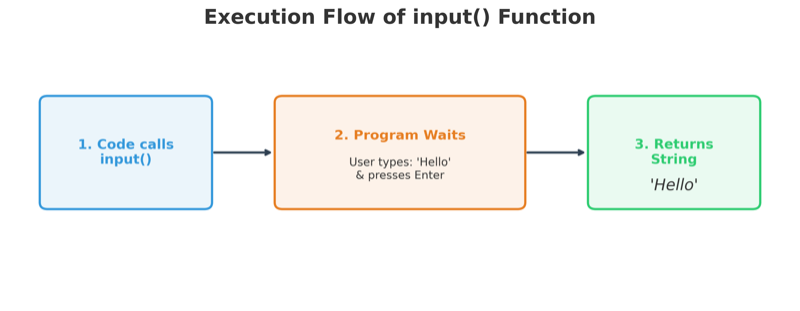
In the diagram above, no input is given to the input() function itself. Note that the word "input" is used for two different things here: the user's input and the function named input.
When you run this code, the program stops and waits for you to type a value. In a command-line environment, it waits at the console. In this eBook (and in Jupyter Notebooks), it will open a text box for your input.
a = input()
print(a)
You can also pass a string inside the parentheses to display a prompt to the user:
name = input("Please enter your name: ")
print("Welcome", name)
Important: Any value received via the input() function is stored as a String (str) by default, even if you type a number.
The int() Function
The int() function converts a string to an integer, provided the string contains a valid whole number.
a = "10"
b = int(a)
print(type(a), type(b))  # Output: <class 'str'> <class 'int'>
Function Chaining
To convert user input directly to an integer, you can chain the input() and int() functions together.
age = int(input("Please enter your age: "))
print(age)
When this runs, the string returned by input() is passed directly into int(), and the resulting integer is saved in age. If you enter something that isn't a whole number, a ValueError will be thrown.
While chaining makes code concise, be prudent: Easy readability trumps code efficiency. Chaining too many functions can make code difficult to understand.
Other Built-In Functions
- To receive a number with a decimal point, use
float(). - To receive a boolean value, use
bool().
For a full list, refer to the official Python documentation.
More on the print() Function
The print() function has several useful variations:
Multiple Arguments: You can print multiple variables or expressions by separating them with commas. Python automatically adds a space between them.
print("Numbers:", 10, 15.0, 10 * 15)Keyword Argument: sep
You can change the default space separator using the sep keyword argument.
print("Numbers", 10, 15, sep=",") # Output: Numbers,10,15Keyword Argument: end
By default, print() ends with a newline. Use the end keyword argument to change this behavior.
print(10, end=" ")
print(20)  # Output: 10 20
Best Practices and Common Mistakes
1. Using Parameters vs. Overwriting Them
A common mistake is to ignore function parameters and assign new values to them inside the function body.
Incorrect Example:
def add(x, y):
    x = 10  # This overwrites the 'x' you passed in!
    y = 20  # This overwrites the 'y' you passed in!
    return x + y
This function will always return 30, regardless of what arguments you provide.
Correct Example:
def add(x, y):
    return x + y
2. Handling Different Data Types
Since input() returns a string, using the + operator on two inputs will concatenate them as text rather than adding them as numbers. Always use int() or float() for mathematical operations.
Code Comments
Single-line Comments
Comments explain the "why" and "how" of your code to other humans. They are ignored by the Python interpreter. Start a comment with the # symbol.
# This is a comment and will not be executed
print("Hello!")  # Comments can also be placed after code
Multiline Comments
When a comment spans multiple lines, you can use triple quotes (''' or """). While these are technically multiline strings, if they are not assigned to a variable, Python treats them as comments (often called docstrings).
"""
This is a multiline comment typically
used for documentation or help.
"""

print("hello")
Hands-on Exercises
Exercise 1: Fahrenheit Temp Converter
Write a program to ask the user for a temperature in Celsius, convert it to Fahrenheit, and print the result.
- Use
input()to prompt the user:"Enter temperature in Celsius: ". - Convert the input from a string to a decimal using the
float()function. - Apply the conversion formula:
Fahrenheit = (Celsius * 9/5) + 32. - Print the final converted temperature.
# Write your code below and click Run CodeClick to view Answer
celsius_input = input("Enter temperature in Celsius: ")
celsius = float(celsius_input)

fahrenheit = (celsius * 9/5) + 32
print("Temperature in Fahrenheit:", fahrenheit)
Exercise 2: User-Defined Welcome Card
Write a custom Python function welcome_member that creates a greeting.
- The function should accept two parameters:
usernameandmembership_years(with a default value of1). - Inside the function, print a welcome message displaying both the username and their years of membership.
- Invoke the function twice: once passing only the username, and once passing both the username and years of membership.
# Write your code below and click Run CodeClick to view Answer
def welcome_member(username, membership_years=1):
    print("Welcome,", username, "! Active member for", membership_years, "year(s).")

# Calling with default membership years
welcome_member("Alice")

# Calling with custom membership years
welcome_member("Bob", 5)