Unit 1.7: API and Libraries
API and Libraries
An API (Application Programming Interface) is a specification that explains how to use the classes and methods from a library (a collection of pre-written code). It acts as a bridge between the programmer and the complex code they are using.
- APIs enable abstraction. You don't need to understand the inner workings of a complex feature (like calculating a square root) to use it effectively in your program.
The Menu Analogy Think of an API like a restaurant menu.
- The menu (the API) tells you what dishes are available and what they contain.
- The kitchen (the Library/Implementation) is where the food is actually cooked.
- As a customer (the Programmer), you don't need to know exactly how the chef prepares the meal; you just need to know how to order it from the menu to get the result you want.
Task: Using the Math library API to calculate a square root.
double result = Math.sqrt(25.0); // We use the API to get the square root
System.out.println(result);      // Prints 5.0
We don't need to see the complex mathematical algorithm inside the sqrt method to use it. We only need to know the interface: the name of the method, what inputs it needs, and what it returns. This is what the Java API documentation provides.
Java Packages
In Java, libraries are organized into packages. You can think of a package like a folder on your computer. Just as you organize your files into different folders (e.g., "Homework," "Photos," "Music") to keep them organized and easy to find, Java organizes its thousands of classes into packages based on their functionality.
- Packages prevent naming conflicts. Two classes can have the same name as long as they reside in different packages (e.g.,
java.util.Scannervsmyproject.Scanner).
Why use packages?
- Organization: They group related classes together. For example, the
java.utilpackage contains utility classes (likeScannerandRandom), whilejava.iocontains classes for input and output. - Avoiding Conflicts: They allow different programmers to use the same class name without conflict, as long as they are in different packages.
Visualizing Packages
The diagram below shows how classes are organized in folders (packages) on the file system.
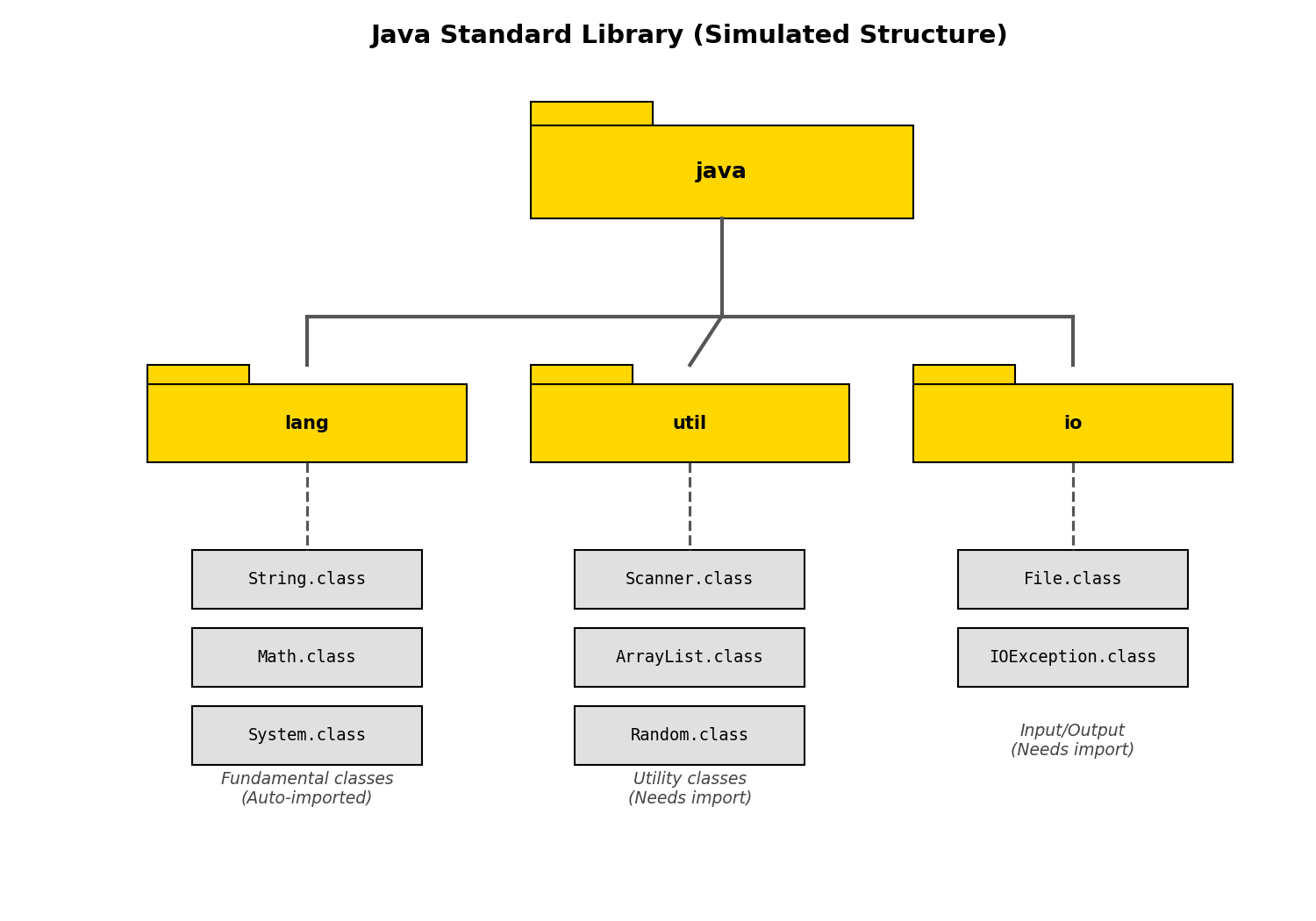
Using Classes from Packages To use a class from a package, you usually need to import it using its full name (package name + class name).
- Exception: The
java.langpackage (which contains fundamental classes likeString,System,Math, andInteger) is automatically imported by Java, so you don't need to import it manually. - Importing: For most other classes, you must use the
importkeyword at the top of your Java file. Task: Importing a class from a package.
import java.util.Scanner; // Imports the Scanner class from the java.util package

public class MyProgram {
    public static void main(String[] args) {
        // Now we can use Scanner because we imported it
        Scanner input = new Scanner(System.in);
    }
}
Attributes and Behaviors
When we use classes from a library, we are often interacting with objects.
- Attributes (State) define what an object is or has.
- Behaviors define what an object does.
Every object has two main characteristics:
- Attributes: These refer to the data related to the class. Attributes are stored in variables (also called fields or instance variables). For example, a
Carobject might have attributes likecolor,model, andtopSpeed. - Behaviors: These refer to what instances (objects) of the class can do, or what can be done with them. Behaviors are defined by methods. For example, a
Carobject might have behaviors likeaccelerate(),brake(), andhonk().
Task: Defining attributes and behaviors in a class.
public class Car {
    // Attributes: Data related to the class, stored in variables
    String color;
    String model;
    int speed;

    // Behaviors: What the object can do, defined by methods
    void accelerate() {
        speed += 10;
    }

    void honk() {
        System.out.println("Beep beep!");
    }
}
When you read API documentation, you are essentially looking at the available behaviors (methods) and sometimes the attributes that you can interact with.