JOIN Operations
The JOIN clause is a fundamental part of SQL used to combine rows from two or more tables based on a related column between them. It allows you to retrieve a unified set of data from multiple tables in a single query.
DROP TABLE IF EXISTS Orders;
DROP TABLE IF EXISTS Customers;

CREATE TABLE Customers (
    CustomerID INTEGER PRIMARY KEY,
    CustomerName VARCHAR(100)
);

CREATE TABLE Orders (
    OrderID INTEGER PRIMARY KEY,
    OrderDate DATE,
    CustomerID INTEGER,
    Amount DECIMAL(10, 2)
);

INSERT INTO Customers (CustomerID, CustomerName)
VALUES (1, 'Alice'),
       (2, 'Bob'),
       (3, 'Charlie'),
       (4, 'Diana');

INSERT INTO Orders (OrderID, OrderDate, CustomerID, Amount)
VALUES (101, '2025-09-20', 2, 50.00),
       (102, '2025-09-21', 1, 75.00),
       (103, '2025-09-22', 2, 25.00),
       (104, '2025-09-23', 99, 100.00);
Database Overview & Sample Data
The database is pre-loaded with the Customers and Orders tables. Run the queries below to explore the data.
Customers Table
SELECT * FROM Customers;Orders Table
SELECT * FROM Orders;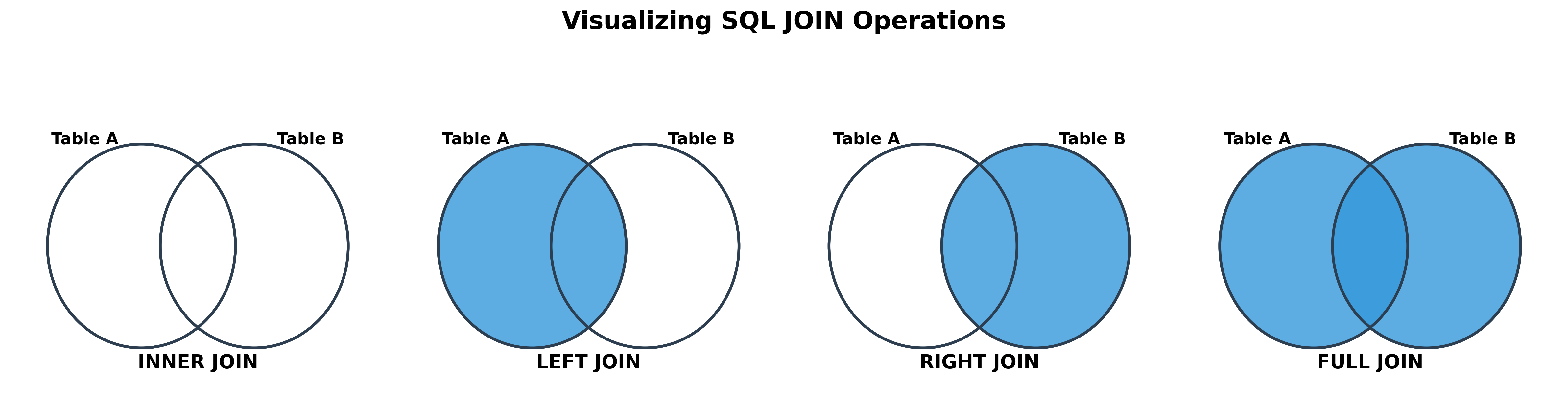
1. INNER JOIN (The Intersection)
The INNER JOIN keyword selects records that have matching values in both tables. It returns only the rows where the join condition is met.
Operation: Get a list of all orders with the corresponding customer's name.
Query:
SELECT Customers.CustomerName, Orders.OrderID, Orders.Amount
FROM Customers
INNER JOIN Orders ON Customers.CustomerID = Orders.CustomerID;
Result:
| CustomerName | OrderID | Amount |
|---|---|---|
| Bob | 101 | 50.00 |
| Alice | 102 | 75.00 |
| Bob | 103 | 25.00 |
Observation:
- Charlie and Diana are missing because they have no orders in the
Orderstable. - Order 104 is missing because its
CustomerID(99) does not have a match in theCustomerstable.
2. LEFT JOIN (or LEFT OUTER JOIN)
The LEFT JOIN keyword returns all records from the left table (Customers), and the matched records from the right table (Orders). The result is NULL from the right side if there is no match.
Operation: Get a list of all customers and any orders they may have placed.
Query:
SELECT Customers.CustomerName, Orders.OrderID, Orders.Amount
FROM Customers
LEFT JOIN Orders ON Customers.CustomerID = Orders.CustomerID;
Result:
| CustomerName | OrderID | Amount |
|---|---|---|
| Alice | 102 | 75.00 |
| Bob | 101 | 50.00 |
| Bob | 103 | 25.00 |
| Charlie | NULL |
NULL |
| Diana | NULL |
NULL |
Observation:
- All customers from the left table are included.
- Charlie and Diana, who have no orders, appear in the result with
NULLvalues for the order columns. - Order 104 is still excluded because its
CustomerIDdoes not match any customer in the left table.
3. RIGHT JOIN (or RIGHT OUTER JOIN)
The RIGHT JOIN keyword returns all records from the right table (Orders), and the matched records from the left table (Customers). The result is NULL from the left side when there is no match.
Operation: Get a list of all orders and the customer who placed them, if known.
Query:
SELECT Customers.CustomerName, Orders.OrderID, Orders.Amount
FROM Customers
RIGHT JOIN Orders ON Customers.CustomerID = Orders.CustomerID;
Result:
| CustomerName | OrderID | Amount |
|---|---|---|
| Bob | 101 | 50.00 |
| Alice | 102 | 75.00 |
| Bob | 103 | 25.00 |
NULL |
104 | 100.00 |
Observation:
- All orders from the right table are included.
- Order 104, which has no matching customer, appears in the result with
NULLfor the customer name. - Charlie and Diana are excluded because they have no matching orders in the right table.
4. FULL OUTER JOIN
The FULL OUTER JOIN keyword returns all records when there is a match in either the left or right table. It combines the functionality of both LEFT JOIN and RIGHT JOIN.
Operation: Get a complete list of all customers and all orders, matching them up where possible.
Query:
SELECT Customers.CustomerName, Orders.OrderID, Orders.Amount
FROM Customers
FULL OUTER JOIN Orders ON Customers.CustomerID = Orders.CustomerID;
Result:
| CustomerName | OrderID | Amount |
|---|---|---|
| Alice | 102 | 75.00 |
| Bob | 101 | 50.00 |
| Bob | 103 | 25.00 |
| Charlie | NULL |
NULL |
| Diana | NULL |
NULL |
NULL |
104 | 100.00 |
Observation:
- The result includes all rows from both tables.
- It shows the customers who have no orders (Charlie, Diana).
- It shows the order that has no customer (Order 104).
- It matches up all the records that have a corresponding entry in the other table.
Hands-on Exercise
Task: Find the names of customers who have placed an order and the total amount they have spent. Use an INNER JOIN and GROUP BY.
Your Query:
-- Write your query hereExpected Results:
| CustomerName | TotalSpent |
|---|---|
| Alice | 75.00 |
| Bob | 75.00 |