Modern and Enhanced Java Features
With each release since Java 8, the language has introduced powerful features that make code more concise, readable, and robust. This section covers some of the most important enhancements you should know.
1. Lambda Expressions (Java 8+)
A lambda expression is a short, anonymous function that can be treated as a value. It allows you to write more concise code, especially when working with collections or implementing functional interfaces.
Syntax: (parameters) -> { body }
- If the body is a single expression, curly braces are not needed:
(a, b) -> a + b - If there is one parameter, parentheses are not needed:
name -> System.out.println(name)
Example: forEach on a List
import java.util.List;
import java.util.ArrayList;

public class LambdaExample {
    public static void main(String[] args) {
        List<String> names = List.of("Alice", "Bob", "Charlie");

        // Using forEach with a lambda to print each name in lowercase
        names.forEach(name -> System.out.println(name.toLowerCase()));
    }
}
This is much more expressive than a traditional for loop.
2. Functional Interfaces (Java 8+)
A functional interface is an interface that contains exactly one abstract method. They are the target type for lambda expressions. The @FunctionalInterface annotation is used to ensure this contract at compile time.
Example: Creating a custom Functional Interface
@FunctionalInterface
interface MathOperation {
    int operate(int a, int b);
}

public class Calculator {
    public static void main(String args[]) {
        // We can assign a lambda to our functional interface
        MathOperation addition = (a, b) -> a + b;
        MathOperation subtraction = (a, b) -> a - b;

        System.out.println("10 + 5 = " + addition.operate(10, 5));    // Output: 15
        System.out.println("10 - 5 = " + subtraction.operate(10, 5)); // Output: 5
    }
}
Java provides many built-in functional interfaces in the java.util.function package, such as Predicate, Function, and Consumer.
3. Method References (::) (Java 8+)
The double colon (::) in Java is the Method Reference operator. It is shorthand syntax for writing simple lambda expressions that just pass parameters straight through to an existing method. Instead of defining a brand-new inline lambda body like (x) -> doSomething(x), :: points directly to an existing method by name.
| Reference Type | Lambda Equivalent | Method Reference (::) |
|---|---|---|
| Static method | x -> Objects.nonNull(x) |
Objects::nonNull |
| Instance method on an object | x -> x.getId() |
CourseAssignment::getId |
| System output/Print | x -> System.out.println(x) |
System.out::println |
| Constructor | () -> new ArrayList<>() |
ArrayList::new |
Why prefer Objects::nonNull over x -> x != null?
While both expressions perform the same logical check, using the method reference Objects::nonNull is generally preferred in modern Java codebases for several reasons:
- Readability and Intent:
Objects::nonNullis highly declarative and reads like plain English. In stream pipelines,.filter(Objects::nonNull)immediately conveys the intent of "filtering for non-null objects" with less cognitive load than reading inline logical comparisons. - Reduction of Boilerplate: It eliminates the need for dummy parameter declarations (like
x ->) and operator symbols (!=), reducing visual clutter in complex operations. - Built for Functional APIs: The
Objects.nonNull(Object)andObjects.isNull(Object)methods were explicitly introduced in Java 8 alongside Streams to serve as clean, ready-to-usePredicatetargets for method references.
4. The Stream API (Java 8+)
A Stream is a sequence of elements from a source (like a Collection) that supports powerful aggregate operations. Streams don't store data; they process it through a pipeline of operations.
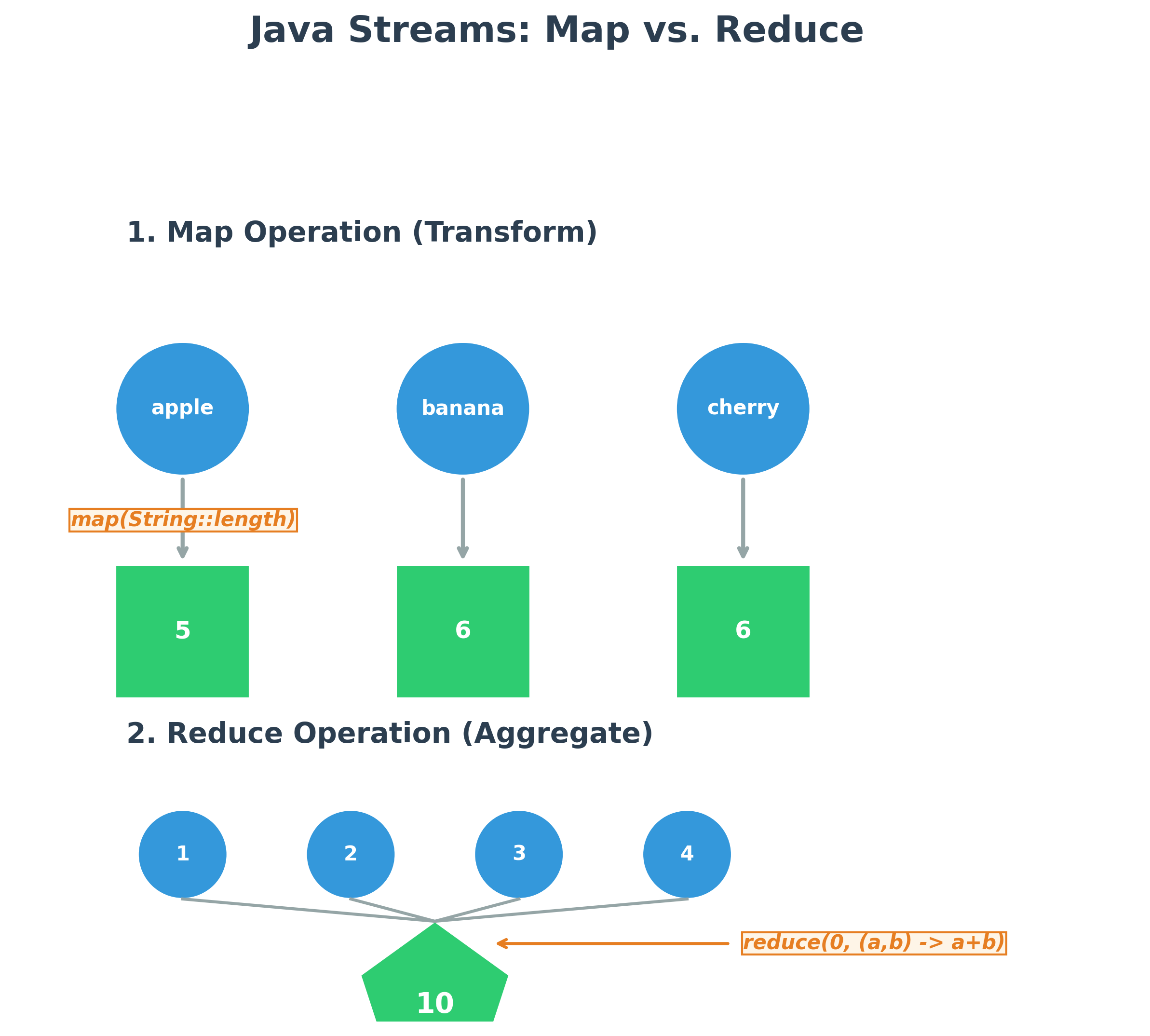
Common Pipeline: source -> intermediate_operation() -> terminal_operation()
filter() - Filtering a Collection
The filter operation returns a new stream containing only the elements that match a given condition (a Predicate).
import java.util.ArrayList;
import java.util.List;
import java.util.stream.Collectors;

public class StreamExample {
	public static void main(String[] args) {
		List<String> names = List.of("Alice", "Bob", "Anna", "Charlie");

		// what we learned up to this point
		List<String> aList = new ArrayList<String>();
		for (String string : names) {
			if(string.startsWith("A")) {
				aList.add(string);
			}
		}

		// new way to implement the same functionality
		List<String> namesStartingWithA = names.stream()
		    .filter(name -> name.startsWith("A"))
		    .collect(Collectors.toList()); // Collects the results into a new List

		System.out.println(namesStartingWithA); // Output: [Alice, Anna]
	}
}
map() - Transforming Data
The map operation transforms each element in the stream into another object. You can run this examples in jshell without the class and main methods.
import java.util.List;
import java.util.stream.Collectors;

List<String> names = List.of("Alice", "Bob", "Charlie");

List<Integer> nameLengths = names.stream()
    .map(name -> name.length()) // or String::length
    .collect(Collectors.toList());

System.out.println(nameLengths); // Output: [5, 3, 7]
reduce() - Aggregating Data
The reduce operation combines all elements of a stream into a single result. You can run this examples in jshell without the class and main methods.
import java.util.List;

List<Integer> numbers = List.of(1, 2, 3, 4, 5);

// 0 is the starting value.
// (sum, number) -> sum + number is the accumulator.
int sum = numbers.stream()
    .reduce(0, (currentSum, number) -> currentSum + number);

System.out.println(sum); // Output: 15
5. The Optional Object (Java 8+)
Optional<T> is a container object that may or may not contain a non-null value. Its purpose is to provide a clear and explicit way to handle null values, helping to prevent NullPointerException.
Key Methods:
Optional.of(value): Creates an Optional. ThrowsNullPointerExceptionif value is null.Optional.ofNullable(value): Creates an Optional. Allows the value to be null.isPresent(): Returnstrueif a value is present.get(): Returns the value if present, otherwise throwsNoSuchElementException.orElse(defaultValue): Returns the value if present, otherwise returns a default value.ifPresent(consumer): Executes the given code block only if a value is present.
Example:
import java.util.Optional;

public class OptionalExample {
    public void printName(String name) {
        Optional<String> nameOpt = Optional.ofNullable(name);

        // Using orElse to provide a default value
        String displayName = nameOpt.orElse("Guest");
        System.out.println("Hello, " + displayName);

        // Using ifPresent to perform an action
        nameOpt.ifPresent(n -> System.out.println("Your name has " + n.length() + " letters."));
    }

    public static void main(String[] args) {
        OptionalExample example = new OptionalExample();
        // Calling the method:
        example.printName("John");   // Output: Hello, John \n Your name has 4 letters.
        example.printName(null);     // Output: Hello, Guest
    }
}
6. Modern Date and Time API (Java 8+)
The java.time package provides a powerful and immutable API for handling dates and times, replacing the old Date and Calendar classes.
LocalDate: Represents a date (year, month, day).LocalTime: Represents a time (hour, minute, second).LocalDateTime: Represents both date and time.DateTimeFormatter: For parsing and formatting dates.
Example: Parsing and Formatting
import java.time.LocalDate;
import java.time.format.DateTimeFormatter;

public class DateExample {
    public static void main(String[] args) {
        // 1. Parsing a string into a date object
        String dateString = "2025-10-16";
        DateTimeFormatter inputFormatter = DateTimeFormatter.ofPattern("yyyy-MM-dd");
        LocalDate myDate = LocalDate.parse(dateString, inputFormatter);

        System.out.println("Year: " + myDate.getYear());          // 2025
        System.out.println("Day of Week: " + myDate.getDayOfWeek()); // THURSDAY

        // 2. Formatting a date object into a string
        DateTimeFormatter outputFormatter = DateTimeFormatter.ofPattern("MMM dd, yyyy");
        String formattedDate = myDate.format(outputFormatter);
        System.out.println("Formatted Date: " + formattedDate); // Oct 16, 2025
    }
}
7. Interactive Shell (jshell) (Java 9+)
Java 9 introduced an interactive shell (REPL) called jshell. It's a great tool for testing simple statements, expressions, and APIs without needing to write a full class.
To start it, just type jshell in your command line.
$ jshell
|  Welcome to JShell -- Version 17.0.1
|  For an introduction type: /help intro

jshell> int x = 10;
x ==> 10

jshell> int y = 20;
y ==> 20

jshell> System.out.println("The sum is " + (x + y));
The sum is 30

jshell> /exit
|  Goodbye
8. var Keyword (Type Inference) (Java 10+)
The var keyword can be used to declare local variables. The compiler infers the type from the value on the right-hand side.
- Reduces verbosity, especially with complex generic types.
- Can only be used for local variables (inside methods).
// Before Java 10
String message = "Hello, World!";
Map<String, List<Integer>> myMap = new HashMap<String, List<Integer>>();

// With 'var' (Java 10+)
var message2 = "Hello, World!"; // Inferred as String
var myMap2 = new HashMap<String, List<Integer>>(); // Inferred as HashMap<...>

// 'var' is great for loops
for (var entry : myMap2.entrySet()) {
    // entry is inferred as Map.Entry<String, List<Integer>>
    System.out.println(entry.getKey());
}
9. Enhanced switch Expressions (Java 12+)
The new switch can be used as an expression that returns a value.
- Uses
->(arrow) syntax, which prevents accidental fall-through. - More concise and less error-prone.
- Can handle multiple cases per line.
// Traditional switch statement
int day = 3;
String dayName;
switch (day) {
    case 1:
    case 2:
    case 3:
    case 4:
    case 5:
        dayName = "Weekday";
        break;
    case 6:
    case 7:
        dayName = "Weekend";
        break;
    default:
        dayName = "Invalid day";
        break;
}

// Enhanced switch expression
String dayName2 = switch (day) {
    case 1, 2, 3, 4, 5 -> "Weekday";
    case 6, 7 -> "Weekend";
    default -> "Invalid day";
}; // Note the semicolon