Unit 3.1: Abstraction
Abstraction
Abstraction reduces complexity by hiding irrelevant details and focusing on the main idea.
- Abstraction allows us to work with high-level concepts without being overwhelmed by the underlying technical implementation.
When you drive a car, you use simple controls like a steering wheel and pedals. You don't need to know the complex mechanics of the engine or transmission. This is abstraction. In programming, we create classes to model real-world concepts in a simplified way.
Data Abstraction
Data abstraction manages complexity by giving a collection of data a name (like a class name) without requiring the programmer to constantly reference the specific, concrete details of how that data is stored.
It provides a separation between:
- Abstract Properties: What the data represents (e.g., a "Student" or a "Coordinate").
- Concrete Details: How the data is actually represented in memory (e.g., a
Stringfor a name, anintfor an age).
Example: A Point object
Instead of thinking about two separate integers x and y every time you want to represent a location, you use the abstract name Point.
Task: Using a Point object to abstract coordinate data.
// We treat 'location' as a single "thing" (Data Abstraction)
Point location = new Point(5, 10);

// We don't have to worry about the internal representation
// unless we specifically need the individual coordinates.
Attributes (Instance vs. Class Variables)
An attribute is data defined in a class.
- Instance variables are unique to each object.
- Class variables (marked
static) are shared among all objects of the class.
These concepts were discussed earlier in the Types of Variables page.
Task: Implementing instance and class variables in a Student tracker.
class Student {
    // Instance variable: each Student object gets its own copy of 'name'.
    String name;

    // Class variable: this one variable is shared across all Student objects.
    static int studentCount = 0;

    public Student(String name) {
        this.name = name;
        studentCount++; // Increment the single, shared count
    }
}

public class School {
    public static void main(String[] args) {
        Student s1 = new Student("Alice");
        Student s2 = new Student("Bob");
        System.out.println("Student 1 is " + s1.name); // Alice
        System.out.println("Student 2 is " + s2.name); // Bob
        System.out.println("Total students: " + Student.studentCount); // 2
    }
}
Procedural Abstraction
Procedural abstraction provides a name for a process and allows a method to be used only knowing what it does, not how it does it.
Key aspects of procedural abstraction include:
1. Method Decomposition A programmer breaks down larger, complex behaviors of a class into smaller, more manageable behaviors by creating specific methods for each task.
Task: Decomposing a complex action into smaller procedural steps.
class SmartOven {
    // High-level behavior: The user just calls 'cookPizza()'
    public void cookPizza() {
        preheat();
        bake();
        coolDown();
    }

    // Decomposition: Breaking the big task into smaller, internal steps
    private void preheat() { /* logic to heat up */ }
    private void bake() { /* logic to cook */ }
    private void coolDown() { /* logic to vent heat */ }
}
2. Generalization and Code Reuse Procedural abstraction may extract shared features to generalize functionality instead of duplicating code. This allows for code reuse.
Task: Generalizing shared logic to prevent code duplication.
class BankAccount {
    private double balance = 100.0;

    public void deposit(double amount) {
        balance += amount;
        updateStatement(); // Reusing the same notification logic
    }

    public void withdraw(double amount) {
        balance -= amount;
        updateStatement(); // Reusing the same notification logic
    }

    // Generalized method: Extracted shared logic (printing the statement)
    // to avoid writing the same System.out.println in both methods.
    private void updateStatement() {
        System.out.println("Transaction complete. Current balance: $" + balance);
    }
}
3. External Procedural Abstraction (Library methods) We can use methods from built-in libraries without knowing how they are implemented.
Task: Calling library methods as an abstraction.
double number = 64.0;
// We don't need to know the complex algorithm used by the Math class
double squareRoot = Math.sqrt(number);
System.out.println("The square root is: " + squareRoot); // 8.0
Method Parameters
Using parameters allows procedures to be generalized. Instead of writing separate methods for every specific case, we write one method that can handle a wide range of input values.
Example: Hardcoded vs. Generalized
Without parameters (Hardcoded - Inflexible): Task: Identifying the limitations of hardcoded procedural logic.
// We would need a new method for every person!
public void printHelloAlice() {
    System.out.println("Hello, Alice!");
}
public void printHelloBob() {
    System.out.println("Hello, Bob!");
}
With parameters (Generalized - Flexible): Task: Generalizing logic using method parameters.
// One method handles any name!
public void printGreeting(String name) {
    System.out.println("Hello, " + name + "!");
}

// Usage
printGreeting("Alice");   // Output: Hello, Alice!
printGreeting("Bob");     // Output: Hello, Bob!
printGreeting("Charlie"); // Output: Hello, Charlie!
Example: Reusing logic with different arguments This method is general. It can add any two integers.
Task: Reusing a generalized method with different arguments.
public int add(int a, int b) {
    return a + b;
}

// The method is reused with different arguments.
int sum1 = add(5, 10);  // 15
int sum2 = add(100, 2); // 102
Changing Internal Implementation
Procedural abstraction allows programmers to change the internals of a method (to make it faster, more efficient, use less storage, etc.) without needing to notify method users of the change, as long as the method signature and what the method does (its return value/effect) is preserved.
Example: Improving Efficiency
Imagine a Sorter class. Initially, the sort method uses a slow algorithm. Later, the programmer updates it to use a fast algorithm. The code calling sort does not need to change.
Version 1: Slow Implementation (Bubble Sort) Task: Implementing a basic sorting algorithm.
public class Sorter {
    // Signature: public void sort(int[] arr)
    public void sort(int[] arr) {
        // Slow internal logic
        for (int i = 0; i < arr.length; i++) {
            for (int j = 0; j < arr.length - 1; j++) {
                if (arr[j] > arr[j + 1]) {
                    int temp = arr[j];
                    arr[j] = arr[j + 1];
                    arr[j + 1] = temp;
                }
            }
        }
    }
}
Version 2: Fast Implementation (Built-in Sort) Task: Updating the internal implementation without changing the signature.
import java.util.Arrays;

public class Sorter {
    // Signature remains EXACTLY the same: public void sort(int[] arr)
    public void sort(int[] arr) {
        // Fast internal logic
        Arrays.sort(arr);
    }
}
The calling code mySorter.sort(myArray); works for BOTH versions without modification.
Designing a Class
Before coding, it's helpful to design a class by identifying its attributes and behaviors. This design is often represented using UML (Unified Modeling Language) diagrams.
UML Class Diagrams
A UML diagram provides a visual representation of a class's structure. It is typically divided into three sections:
- Top: The class name.
- Middle: Attributes (instance variables).
- Bottom: Behaviors (methods and constructors).
Visibility Notation in UML
-(Minus): Denotesprivate(hidden from external classes).+(Plus): Denotespublic(part of the class's interface).
Example: UML Diagram for BankAccount
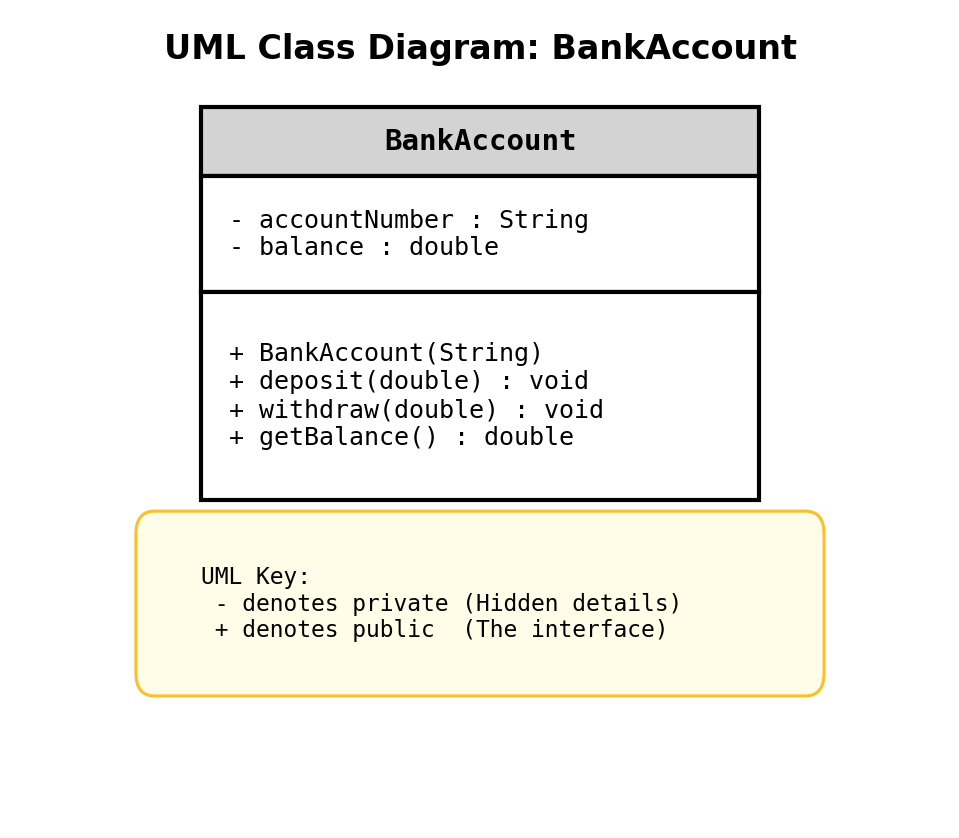
The diagram above shows the attributes accountNumber and balance as private (-), while the methods like deposit and getBalance are public (+).
Example Design for a BankAccount Class in Code:
- Attributes:
private String accountNumber;private double balance;
- Behaviors:
public void deposit(double amount)public void withdraw(double amount)public double getBalance()